Shopify Order Tracking App: How to Choose the Right One
A practical guide to choosing a Shopify order tracking app that reduces WISMO tickets, improves post-purchase trust, and fits your store's growth stage.
If you're shopping for a Shopify order tracking app, you're probably dealing with the same problem most growing stores hit: customers want updates faster than your support team can answer them.
A good tracking setup does more than show a tracking number. It reduces "where is my order" tickets, gives customers a branded place to check status, and helps you catch shipping issues before they turn into angry emails. In this guide, you'll see what Shopify gives you out of the box, what a Shopify order tracking app should actually do, and how to choose the right one for your store in 2026.
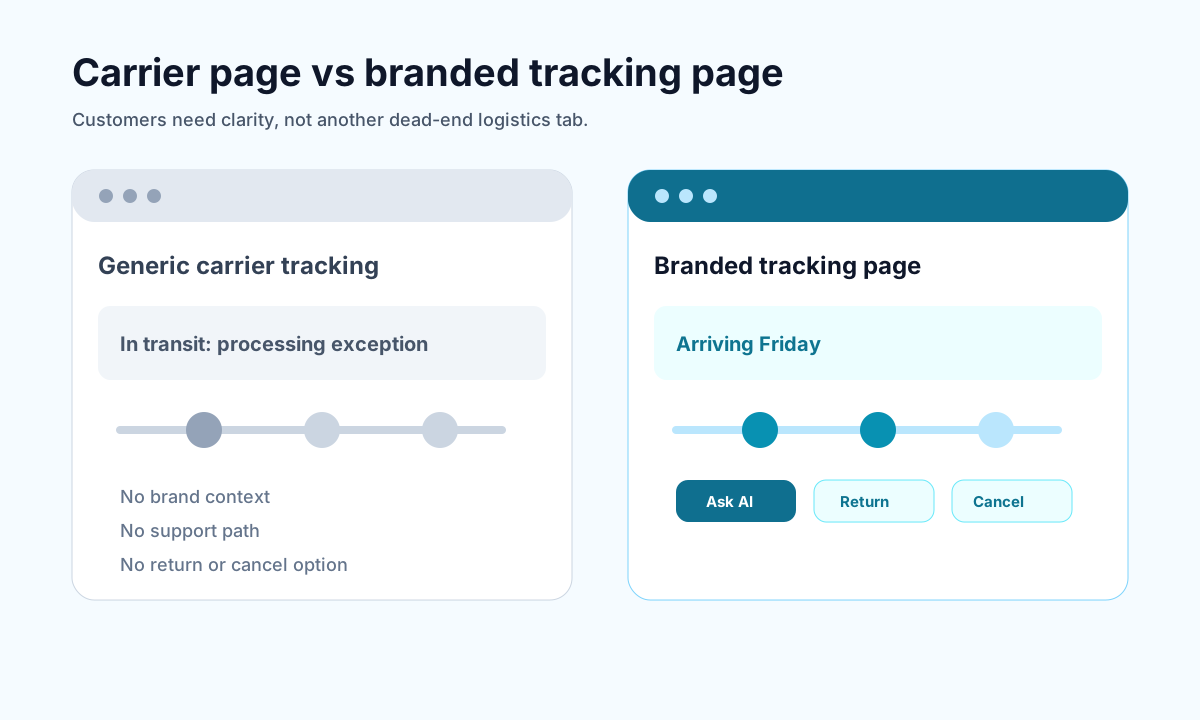
<!-- trexa-visual-elements:start -->Visual guide: native tracking vs a tracking app
The real difference is not just prettier tracking. It is whether the tracking experience prevents the next support ticket.
| Option | Best for | Limitation |
|---|---|---|
| Shopify native tracking | Basic shipment visibility | Limited support context and branding. |
| Tracking-only app | Better tracking presentation | May not reduce returns, cancellations, or support work. |
| Post-purchase platform | Tracking plus support reduction | Best when WISMO and returns are operational problems. |
What a Shopify order tracking app should actually solve
<!-- trexa-section-visual:order -->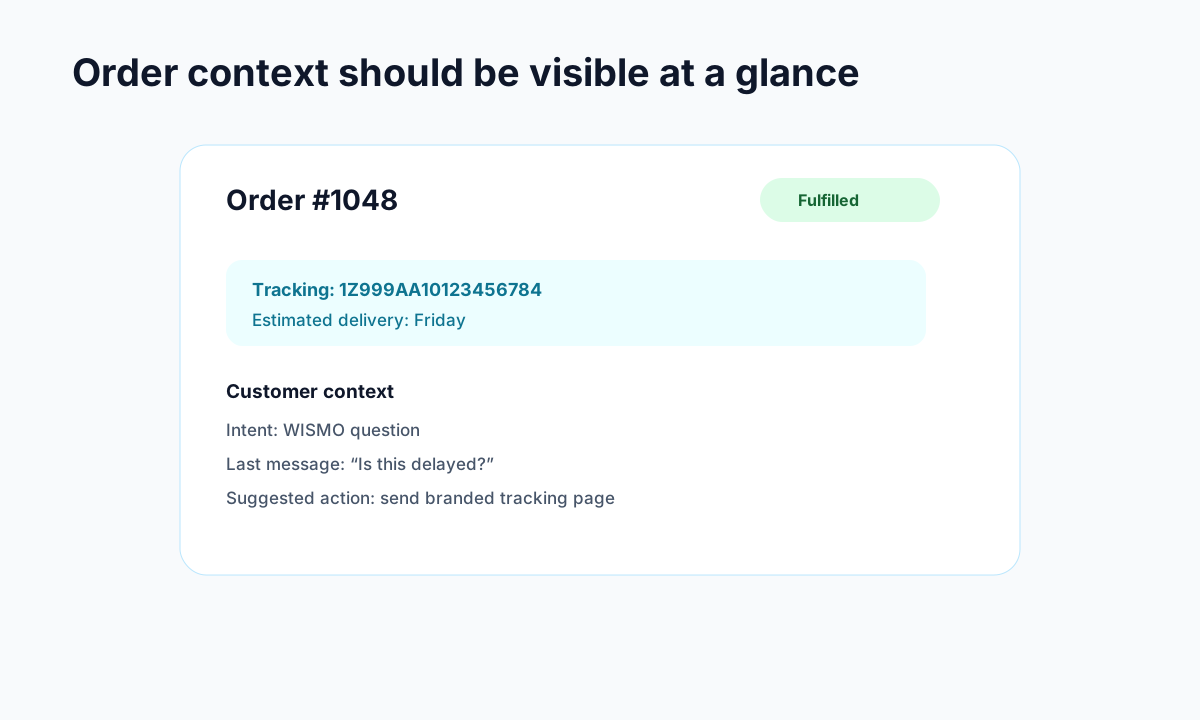
Example: the order context support teams need before replying.
Most merchants do not need another dashboard just to admire package movement. They need fewer support tickets and a smoother post-purchase experience.
The right app should solve five practical problems:
- Too many WISMO tickets. Customers ask for updates because they cannot find them easily.
- A weak post-purchase experience. Carrier pages feel generic and push customers away from your brand.
- No proactive communication. Delays happen, but silence makes them feel worse.
- Limited visibility across carriers. Native tracking can feel fragmented once you ship at scale.
- Missed revenue after checkout. Tracking pages get traffic, and smart brands use that attention well.
This is why merchants who care about support efficiency often pair tracking improvements with broader Shopify customer service app options and better branded order tracking pages.
Shopify order tracking app vs Shopify's native tracking
<!-- trexa-section-visual:tracking -->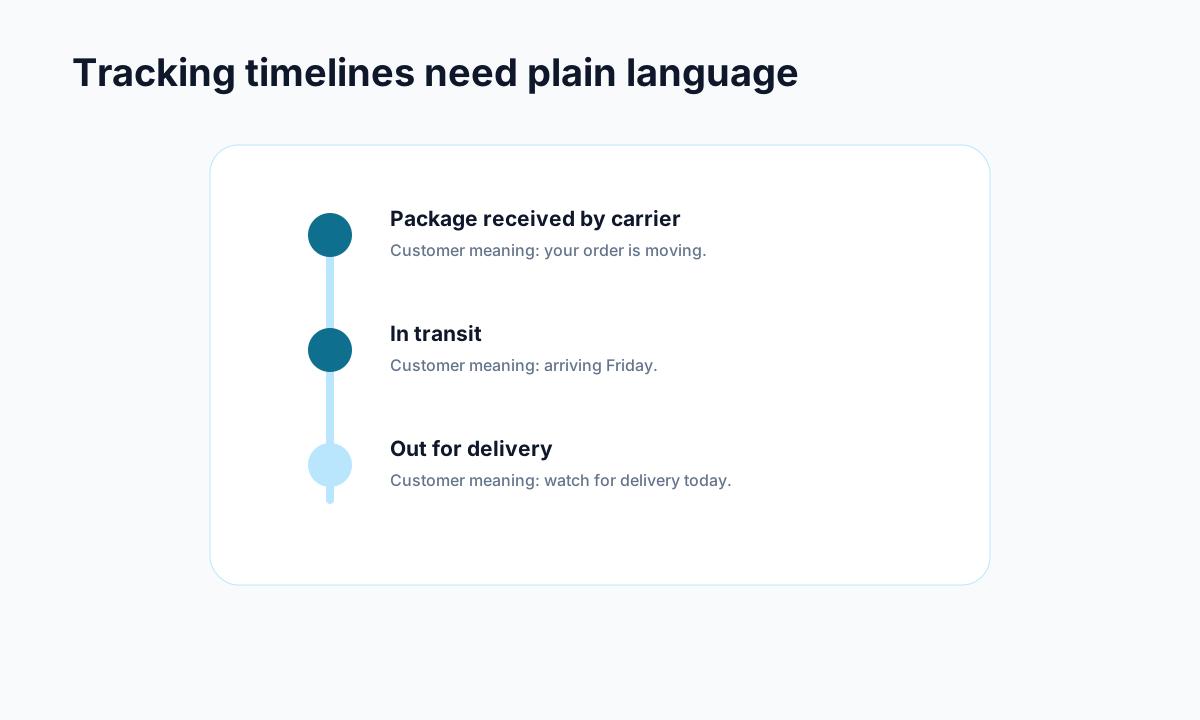
Example: carrier events become useful when they are translated into plain customer language.
Shopify already includes basic tracking. When you fulfill an order and add a tracking number, Shopify can send a shipping confirmation email and update the order status page.
That is enough for some small stores. It stops being enough when your order volume grows or your support inbox starts filling up.
Here is where native tracking usually falls short:
- Branding is limited. The customer experience is functional, not memorable.
- Notifications are basic. Customers often need more than a single shipment email.
- Exceptions are easy to miss. Delays, stalled packages, and failed deliveries need proactive handling.
- Multi-carrier workflows get messy. The more shipping complexity you add, the more gaps appear.
- Upsell opportunities are weak. The order status page should not be dead space.
A strong Shopify order tracking app fills those gaps with branded pages, better alerts, analytics, and exception handling.
Features to look for in a Shopify order tracking app
<!-- trexa-section-visual:comparison -->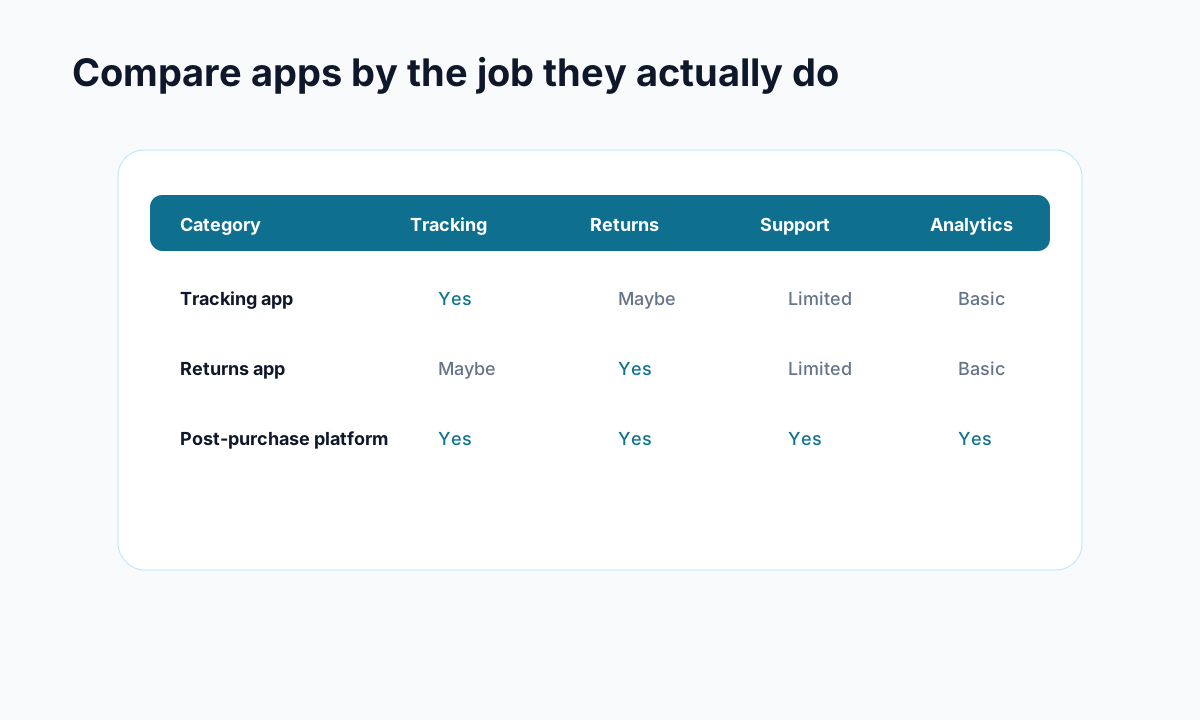
Example: compare apps by the operational jobs they cover, not by feature-page language.
Not every app deserves a spot in your stack. Some are glorified tracking links with nicer colors.
When comparing options, focus on these features first.
Branded tracking pages
A branded tracking page keeps customers on your site instead of sending them to a carrier page that looks nothing like your store. That matters because post-purchase trust is built in small moments.
Look for:
- Custom logo, colors, and domain support
- Mobile-friendly layouts
- Clear delivery milestones
- Space for FAQs, support links, or product recommendations
Proactive notifications
The best apps do not wait for customers to ask questions. They send updates when something important happens.
Look for email or SMS support for:
- Shipped
- In transit
- Out for delivery
- Delivered
- Delayed or exception states
According to Shopify's own coverage of WISMO, weak communication after checkout can hurt customer trust and retention. Proactive updates fix a lot of that before support ever gets involved.
Multi-carrier support
If you ship with more than one carrier, broad carrier coverage is not a nice bonus. It is table stakes.
Look for apps that support the carriers you already use plus enough flexibility for growth. This matters even more for international brands and stores working with 3PLs.
Exception management
This is where a lot of comparison posts stay too shallow. Real tracking quality is not just about showing progress when things go well. It is about what happens when they do not.
A useful Shopify order tracking app should help you spot:
- Stalled shipments
- Failed delivery attempts
- Lost packages
- Unexpected transit delays
If the app can trigger team alerts or customer updates when those issues happen, even better.
Upsell and retention tools
Tracking pages often get revisited multiple times per order. That makes them one of the highest-attention pages in the post-purchase journey.
The best apps use that space for:
- Product recommendations
- Discount offers
- Review requests
- Loyalty prompts
That approach fits well with a broader strategy to reduce Shopify support tickets while still improving repeat purchase potential.
The best Shopify order tracking app categories for different stores
There is no universal winner. The right choice depends on what problem hurts most in your business.
Best for small stores
If you are early-stage, keep it simple. You probably want an app with:
- A free or low-cost plan
- Easy setup
- Basic branded tracking
- Core notifications
At this stage, the goal is not perfection. It is reducing avoidable support work without adding operational complexity.
Best for scaling DTC brands
As volume rises, you need more than pretty tracking pages. You need operational visibility.
Look for:
- Strong analytics
- Exception monitoring
- Better notification flows
- Support for multiple carriers and regions
This is usually the point where support costs start rising fast, which is why posts on Shopify customer service cost matter so much. Tracking is one of the cleanest ways to lower that cost.
Best for international and dropshipping stores
These stores need:
- Broad carrier coverage
- Multilingual tracking pages
- Better estimated delivery visibility
- Optional origin masking in some workflows
Long shipping windows create anxiety fast. Clear tracking and smarter notification timing matter more here than almost anywhere else.
Best for merchants focused on returns and post-purchase ops
Some stores care less about flashy tracking pages and more about what tracking unlocks operationally.
If that is you, prioritize:
- Delivery milestone automation
- Integration with helpdesk or returns workflows
- Visibility into delays and exceptions
- Better coordination between support and fulfillment
That tends to pair naturally with a stronger Shopify returns management setup too.
How to choose the right Shopify order tracking app in 2026
Use this shortlist when narrowing your options.
1. Start with your biggest support problem
If most inbound tickets are shipping questions, choose an app with strong self-serve tracking and proactive notifications.
If your real issue is delivery exceptions, choose one with better alerts and internal visibility.
If your goal is retention, focus on branded pages and post-purchase merchandising.
2. Check the customer experience, not just the feature list
A feature comparison can look impressive while the actual tracking page still feels clunky.
Test for:
- Speed on mobile
- Clarity of delivery updates
- Ease of order lookup
- Whether the page feels like your brand
3. Review pricing against shipment volume
A cheap plan can become expensive fast once your shipment count rises.
Pay attention to:
- Volume caps
- SMS costs
- Feature gating on higher tiers
- Whether analytics or exception monitoring costs extra
4. Think beyond installation
The best Shopify order tracking app is not the one with the longest feature list. It is the one your team will actually use and your customers will actually benefit from.
That usually means choosing software that improves the full post-purchase experience, not just shipment visibility.
Final take
A solid Shopify order tracking app does three things well: it keeps customers informed, reduces avoidable support work, and gives your brand more control over the post-purchase experience.
If Shopify's native tools are enough for your current volume, fine, keep things simple. But once WISMO starts eating support time or your tracking experience feels generic, upgrading is worth it.
Tools like Trexa matter here because the real goal is not tracking for its own sake. It is building a cleaner self-serve support flow after checkout, where customers can track orders, get answers, and solve routine issues without needing to open a ticket.
If you want to improve tracking without creating another disconnected support workflow, start by mapping where your customers get stuck after purchase. That is usually where the right app choice becomes obvious.
Ready to reduce your support tickets?
Trexa gives your Shopify store AI-powered order tracking, automated support, and self-serve returns. Start free with 10 orders/month.
Start FreeExplore related Trexa pages