Shopify Post-Purchase Experience: 5 Fixes for 2026
A practical guide to improving your Shopify post-purchase experience so you reduce support tickets, build trust, and increase repeat purchases.
Shopify post-purchase experience is where a first sale either turns into a repeat customer or quietly dies. Most stores spend heavily to win the order, then hand customers a plain receipt, a vague shipping update, and a slow support queue. That gap creates anxiety, support tickets, and canceled future revenue.
A strong Shopify post-purchase experience fixes that. It gives customers clarity right after checkout, keeps them updated while they wait, and lets them solve small issues without chasing support. In this guide, you'll learn which touchpoints matter most, what to improve first, and how to turn post-purchase into a retention engine.
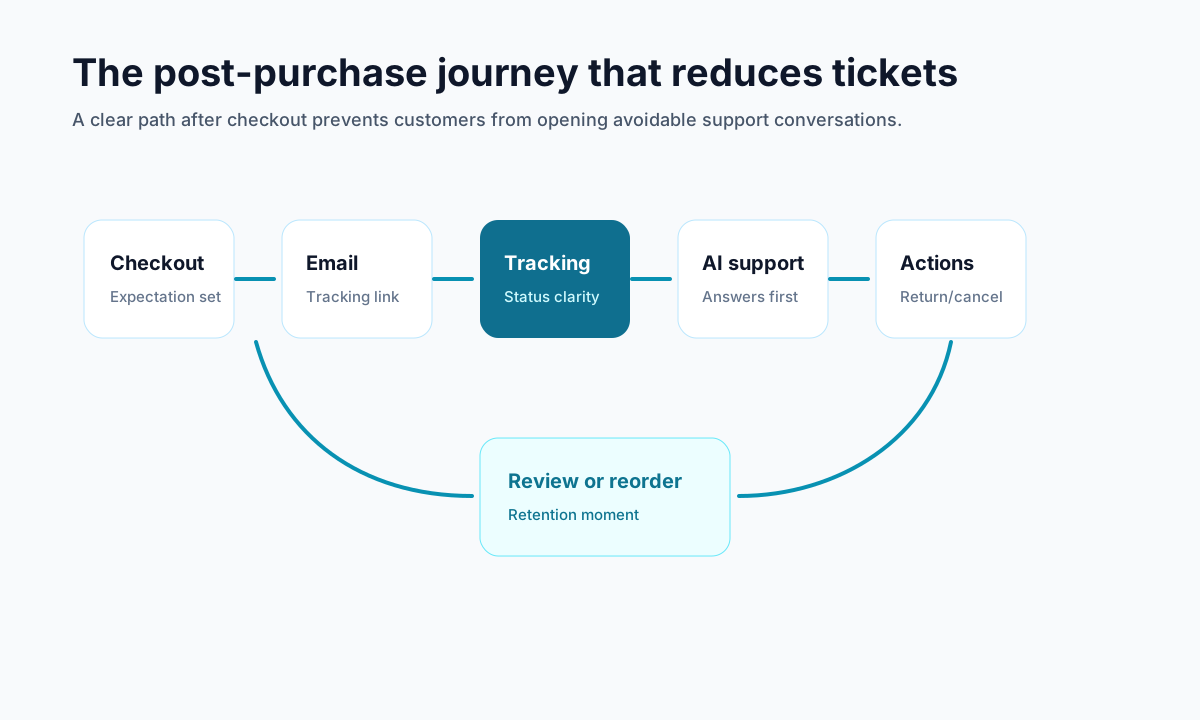
<!-- trexa-visual-elements:start -->Visual guide: the post-purchase journey
A strong post-purchase experience gives customers one obvious next step at every point after checkout.
| Touchpoint | Customer question | Best visual element |
|---|---|---|
| Confirmation | What happens next? | Timeline with delivery expectations. |
| Tracking | Where is my order? | Branded tracking page with status context. |
| Issue resolution | Can I fix this myself? | Self-serve support, returns, and cancellation actions. |
What a Shopify post-purchase experience actually includes
Your Shopify post-purchase experience starts the second payment goes through. It is not just the thank you page.
It includes every interaction after checkout, such as:
- Order confirmation pages and emails
- Delivery estimates and tracking updates
- Order status pages
- Self-serve changes for addresses, returns, or cancellations
- Support conversations when something goes wrong
- Review requests, loyalty nudges, and reorder prompts
Customers judge your store in this window because the risk has shifted. Before checkout, they wonder if they should buy. After checkout, they wonder if they made the right decision.
That is why post-purchase affects both retention and support volume. If people feel informed and in control, they stay calm. If they feel stuck, they email you, open chargebacks, or never come back.
Why Shopify post-purchase experience affects retention and support costs
<!-- trexa-section-visual:support -->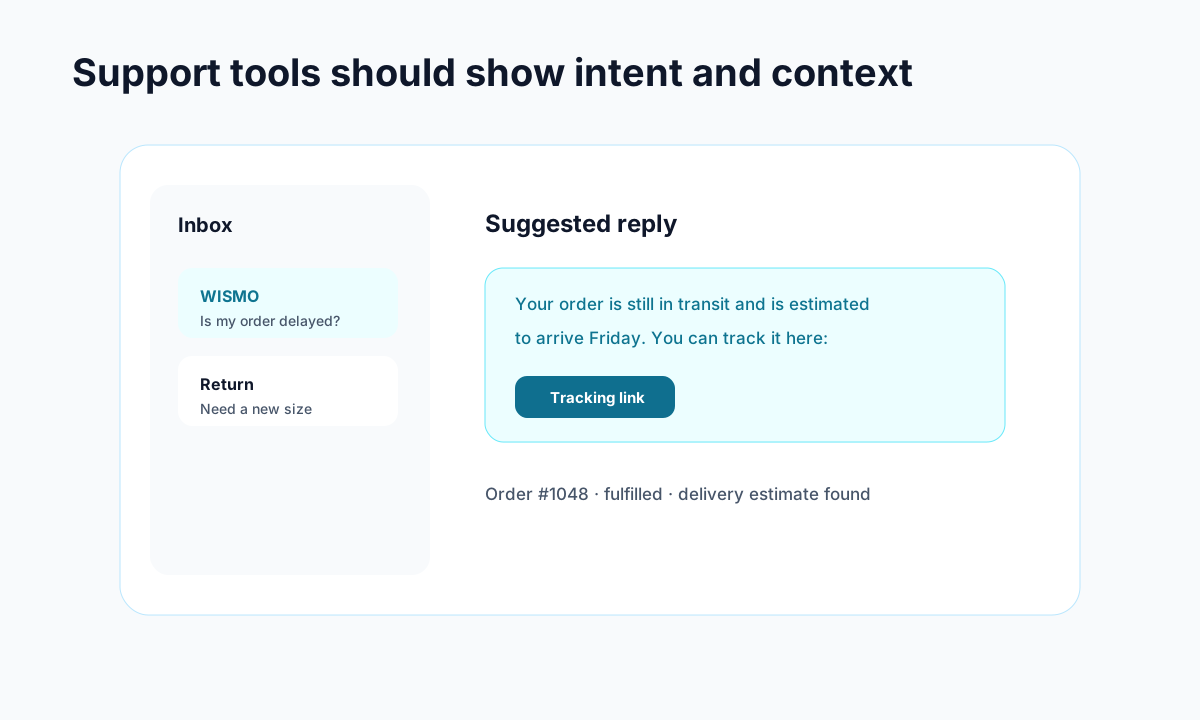
Example: support gets faster when intent, order context, and draft replies live together.
A weak Shopify post-purchase experience creates friction in the exact moments customers are most sensitive.
Here is what usually happens:
- A customer places an order and gets a generic confirmation.
- Shipping timing feels unclear.
- Tracking is hard to find or not branded.
- They notice a mistake or have a question.
- The only option is contacting support.
Now one simple order has become a support cost.
This is also where WISMO, short for "where is my order," starts piling up. If customers do not know what is happening, they assume something is wrong. Proactive updates can prevent a big chunk of those tickets before they ever hit your inbox.
Shopify itself emphasizes that retention matters because returning customers drive outsized revenue over time. Better post-purchase experiences support that by reducing uncertainty and making your store feel reliable. That is also why posts like How to Reduce Shopify Support Tickets by 50% with AI and What Is WISMO and Why It Costs Your Shopify Store Money matter so much to operations teams.
The 5 touchpoints that matter most in Shopify post-purchase experience
Most merchants do not need a huge redesign. They need to tighten the highest impact moments.
1. Confirmation and expectation setting
Your first confirmation should answer three questions immediately:
- Did my order go through?
- When should I expect it?
- Where do I check status later?
Use the thank you page and confirmation email to reduce doubt fast. Include the order summary, shipping timing, and a clear path to tracking.
2. Branded tracking and delivery communication
Branded tracking pages keep customers on your property instead of pushing them to carrier sites that feel confusing or broken. They also give you room to explain delays, answer common questions, and reinforce trust.
If you have not improved this yet, start with Branded Order Tracking Pages: Why Your Shopify Store Needs One. It is one of the simplest ways to make your post-purchase flow feel more polished.
3. Self-serve issue resolution
Many post-purchase questions are small. Customers want to fix an address, check a return policy, or understand cancellation options. They do not want to wait six hours for a reply.
Giving customers controlled self-service reduces frustration and protects your support team from repetitive work.
4. Returns and cancellations
Returns and cancellations are not just policy events. They are trust events. A clumsy return experience can erase an otherwise good order. A smooth one can actually increase the odds that the customer buys again.
That is why a clear returns flow and sensible cancellation rules matter so much in post-purchase. If you need a deeper breakdown, Shopify Returns Management: Best Practices for 2026 covers the operational side.
5. Follow-up after delivery
Delivery is not the end. It is the start of the next decision.
After delivery, send useful follow-up content like setup tips, care instructions, review prompts, or a relevant reorder reminder. Keep it helpful. Customers are far more likely to engage after a successful order than with a random promotion sent two weeks later.
How to improve Shopify post-purchase experience without adding more manual work
The best improvements reduce workload instead of adding to it.
Start here:
- Tighten your transactional emails. Add delivery expectations, support links, and tracking access.
- Make the order status page useful. Include FAQs, return details, and next-step guidance.
- Automate milestone updates. Confirmed, shipped, out for delivery, and delivered are the basics.
- Create self-serve paths. Let customers handle routine needs without opening a ticket.
- Review support data monthly. Find which questions repeat and solve them upstream.
This is also where tools matter. Shopify merchants often stack separate apps for tracking, returns, support, and automation. That can work, but disconnected tools often create a fragmented customer experience. Solutions like Trexa bring tracking, AI support, returns, and cancellations into one post-purchase workflow, which makes consistency much easier.
You do not need perfection on day one. You need fewer dead ends and clearer customer communication.
Metrics to track when you improve Shopify post-purchase experience
If you are investing time here, measure whether it is working.
Track these metrics first:
- WISMO ticket rate
- Overall support tickets per 100 orders
- Repeat purchase rate
- Return completion rate
- Cancellation rate after purchase
- Tracking page engagement
- CSAT after support or delivery
Look for connections, not just raw numbers. For example, if tracking page visits go up while WISMO tickets go down, your communication is probably doing its job. If cancellations spike before fulfillment, your confirmation flow may not be setting expectations clearly enough.
For broader retention benchmarks and strategy, Shopify's customer experience guidance is a useful external reference, and research on customer loyalty loops from McKinsey helps explain why the post-purchase phase influences future buying behavior.
Final take: fix the moments after checkout first
A better Shopify post-purchase experience does not require flashy tactics. It requires fewer blind spots.
Customers want clear updates, easy tracking, fast answers, and a way to solve simple issues on their own. If you deliver that, you lower support costs and give people a reason to trust you again.
If your store still treats post-purchase like an afterthought, that is the first thing to fix. Tools like Trexa can help centralize tracking, AI assistance, returns, and cancellations, but the bigger win is the mindset shift: the order is not finished at checkout. That is where retention starts.
Ready to reduce your support tickets?
Trexa gives your Shopify store AI-powered order tracking, automated support, and self-serve returns. Start free with 10 orders/month.
Start FreeExplore related Trexa pages