Shopify Order Status Page Customization: 9 Fixes for 2026
A practical guide to improving your Shopify order status page so customers get clearer tracking updates, fewer surprises, and fewer reasons to contact support.
Shopify Order Status Page Customization: 9 Fixes for 2026
Shopify order status page customization is one of the simplest ways to improve the post-purchase experience without touching your storefront theme. Customers visit this page when they are most anxious, most curious, and most likely to contact support. If the page feels generic, outdated, or unhelpful, you end up paying for it in WISMO tickets, refund requests, and lost trust.
The good news is that most stores do not need a huge rebuild. A few practical changes can turn your order status page into a calm, useful experience that answers questions before customers ask them. Below, I'll walk through what Shopify gives you by default, where it falls short, and what to add if you want fewer support tickets and a stronger brand experience.
<!-- trexa-visual-elements:start -->Visual guide: what the order status page should answer
The order status page should answer the next likely customer question, not just repeat a shipment state.
| Page element | Question it answers | Support impact |
|---|---|---|
| Clear delivery status | When will it arrive? | Fewer WISMO tickets. |
| Delay explanation | Is something wrong? | Less anxiety and fewer escalations. |
| Self-serve actions | Can I return, cancel, or ask for help? | Fewer manual handoffs. |
Helpful reference:
<!-- trexa-visual-elements:end -->What Shopify order status page customization actually means
<!-- trexa-section-visual:order -->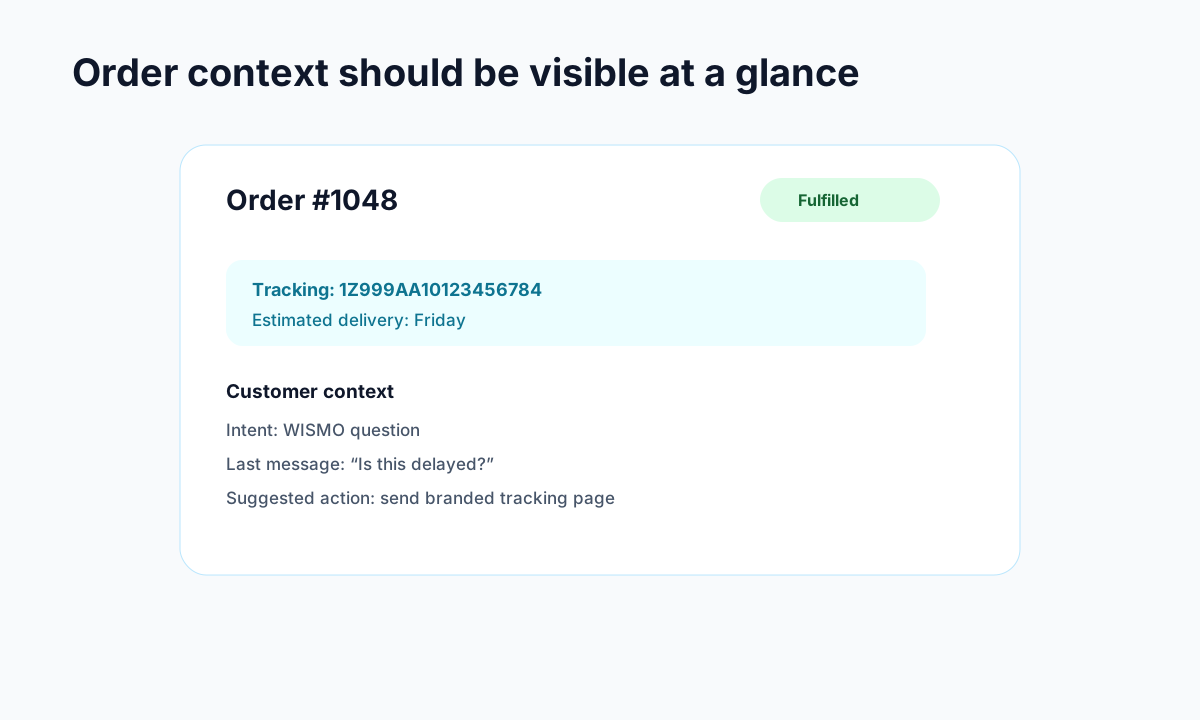
Example: the order context support teams need before replying.
At a basic level, Shopify order status page customization means improving the page customers see after checkout and revisit from their confirmation email or account. Shopify already shows order details, fulfillment progress, and tracking links. For many small stores, that is enough to get started.
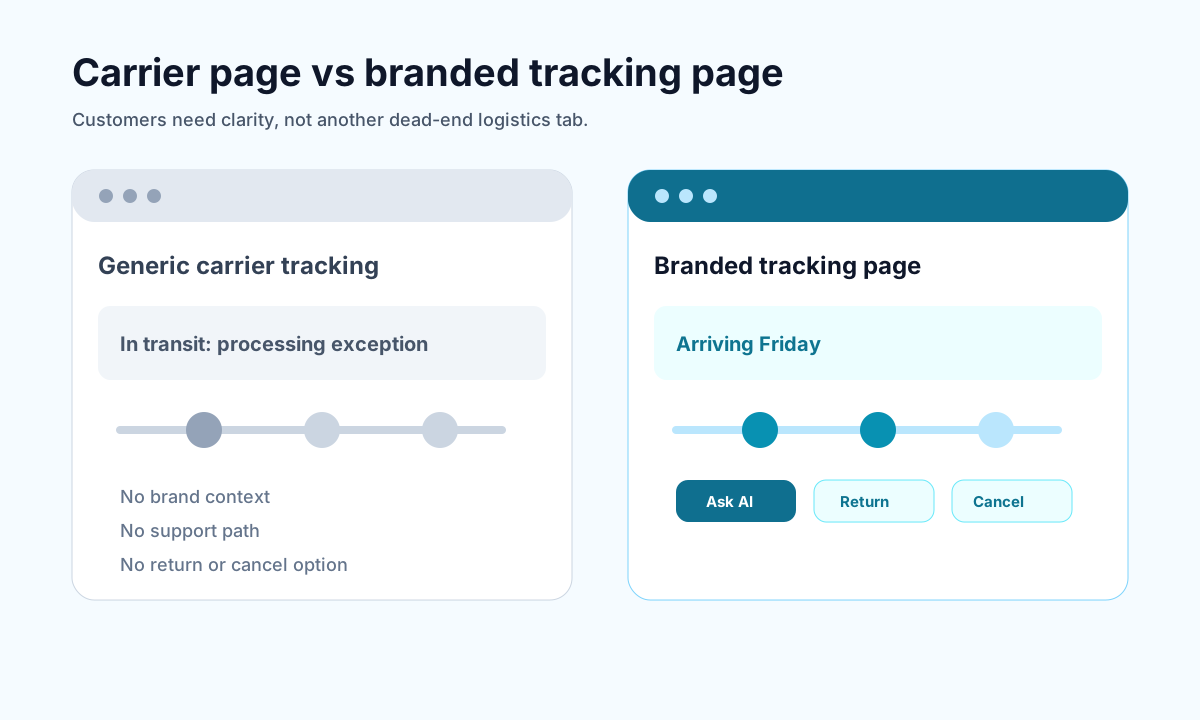
But the default setup is limited. It usually does not reflect your brand well, it rarely answers edge-case questions, and it does not do much to reduce anxiety when a shipment is delayed. That is why merchants often pair Shopify's built-in page with stronger branded order tracking pages or automation that keeps customers updated before they reach out.
There are really two goals here:
- Give customers clarity about what happens next
- Reduce avoidable support contacts by making the page more useful
If your page does those two things well, you are already ahead of a lot of stores.
Why Shopify order status page customization matters for support and retention
<!-- trexa-section-visual:tracking -->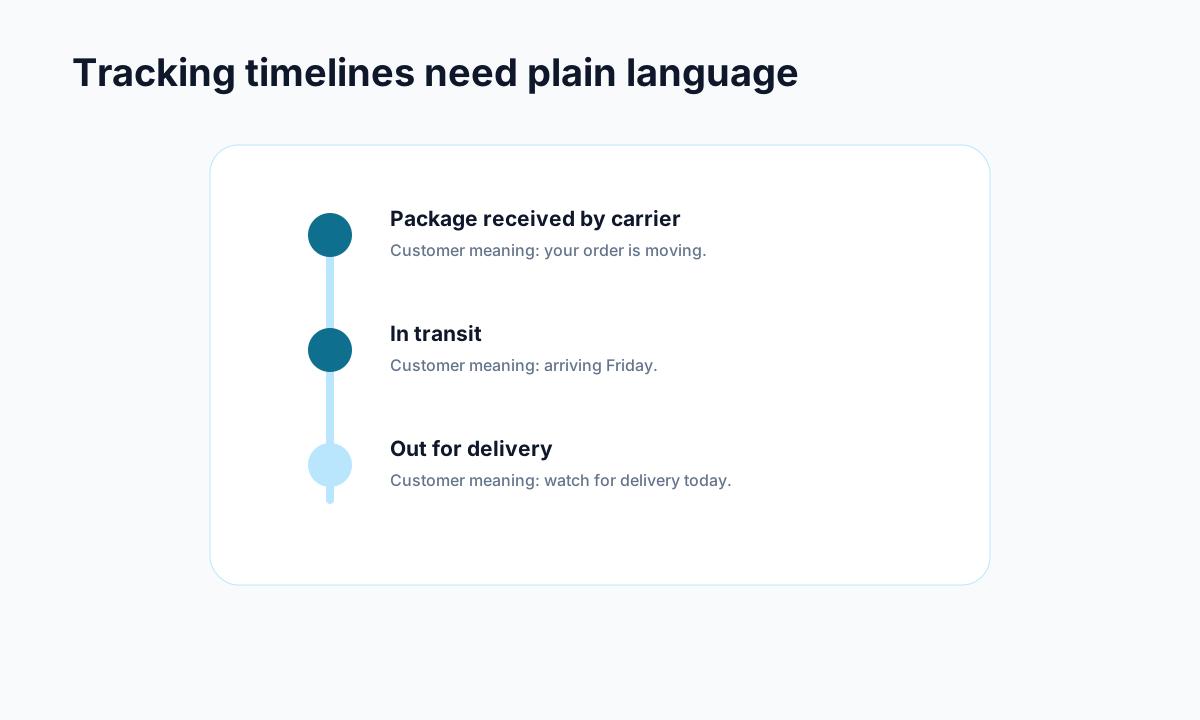
Example: carrier events become useful when they are translated into plain customer language.
Your order status page is not just a receipt screen. It is part of your support funnel.
According to Gorgias, WISMO questions make up a large share of ecommerce support volume. Shopify's own docs also make it clear that customers regularly revisit the order status page after purchase. That means this page gets repeat traffic at a high-intent moment, long after checkout is finished.
A stronger page helps in a few ways:
- It cuts repetitive support questions. If customers can see tracking, delays, delivery expectations, and next steps clearly, they email less.
- It builds trust. A clean branded experience feels more legitimate than pushing people to random carrier pages.
- It creates recovery opportunities. When a shipment stalls, the right message can prevent panic and reduce cancellations.
- It supports repeat purchases. The best post-purchase experiences make customers feel looked after, which matters just as much as your acquisition funnel.
This is also why stores focused on lowering ticket volume should not stop at checkout optimization. Posts like How to Reduce Shopify Support Tickets by 50% with AI and What is WISMO and Why It Costs Your Shopify Store Money matter because the post-purchase experience is where support costs quietly pile up.
9 practical ideas for Shopify order status page customization
You do not need all nine. But if your current page is bare-bones, these are the upgrades with the clearest payoff.
1. Make tracking information impossible to miss
The first job of the page is simple. Customers want to know where the order is.
Put shipment status, carrier, tracking link, and expected delivery information near the top. If you support multiple carriers, make sure the presentation still feels consistent. Confusing layouts create support tickets fast.
2. Explain what each status actually means
Many customers do not know the difference between "label created," "in transit," and "out for delivery." Add short plain-English explanations where possible. This matters more than merchants think.
For example:
- Label created: your package is being prepared for pickup
- In transit: the carrier has the package and it is moving through the network
- Out for delivery: it should arrive today
Tiny bits of clarity reduce a lot of unnecessary worry.
3. Add a visible help path for exceptions
If a package is delayed, missing, or marked delivered but not received, customers should not have to hunt for help. Give them one obvious next step.
That could be a support link, a short FAQ, or a contact option tied to shipping issues. If you handle returns too, make sure the flow lines up with your Shopify returns management best practices instead of sending people into a dead end.
4. Keep the page on-brand
This sounds cosmetic, but it is not. When customers bounce from your store to a generic page full of third-party branding, trust drops.
Use your colors, typography, tone, and logo consistently. The goal is not fancy design. The goal is reassurance. A customer should feel like they are still dealing with your store, not being handed off to a stranger.
5. Show proactive delay messaging
Most stores wait until customers ask what happened. That is backwards.
If a shipment is delayed, use the order status page to acknowledge it early. A short note such as "Your package is moving slower than expected, but it is still in transit" does a lot to calm people down. Silence creates more tickets than bad news does.
6. Make mobile the default experience
A huge share of customers will check their order status page on their phone. If the page is cluttered, hard to scan, or packed with tiny links, it fails.
Prioritize:
- short sections
- obvious buttons
- readable tracking updates
- support options that work well on mobile
7. Add self-serve next steps
Good Shopify order status page customization is not just about tracking. It is also about reducing friction after the purchase.
Depending on your setup, useful self-serve actions can include:
- checking delivery progress
- starting a return request
- confirming shipping details
- getting help with a delayed order
This is exactly why tools like Trexa exist. A stronger post-purchase flow gives customers answers without sending every issue into your inbox.
8. Collect light feedback at the right moment
The order status page gets repeat visits, which makes it a smart place to collect simple feedback. Keep it lightweight. One question is plenty.
You can ask things like:
- Was tracking clear?
- Did you find what you needed?
- Do you have a delivery concern?
That gives you real signals about where the page is falling short.
9. Use the page to prevent cancellations, not just report status
A lot of cancellations happen because customers feel uncertain right after purchase. If the page confirms what happens next, shows timing clearly, and makes support feel accessible, some of those cancellations disappear.
This is especially important for stores with longer fulfillment windows, made-to-order products, or high-ticket items. In those cases, communication is not a nice extra. It is part of the product experience.
Where Shopify's native tools still fall short
<!-- trexa-section-visual:comparison -->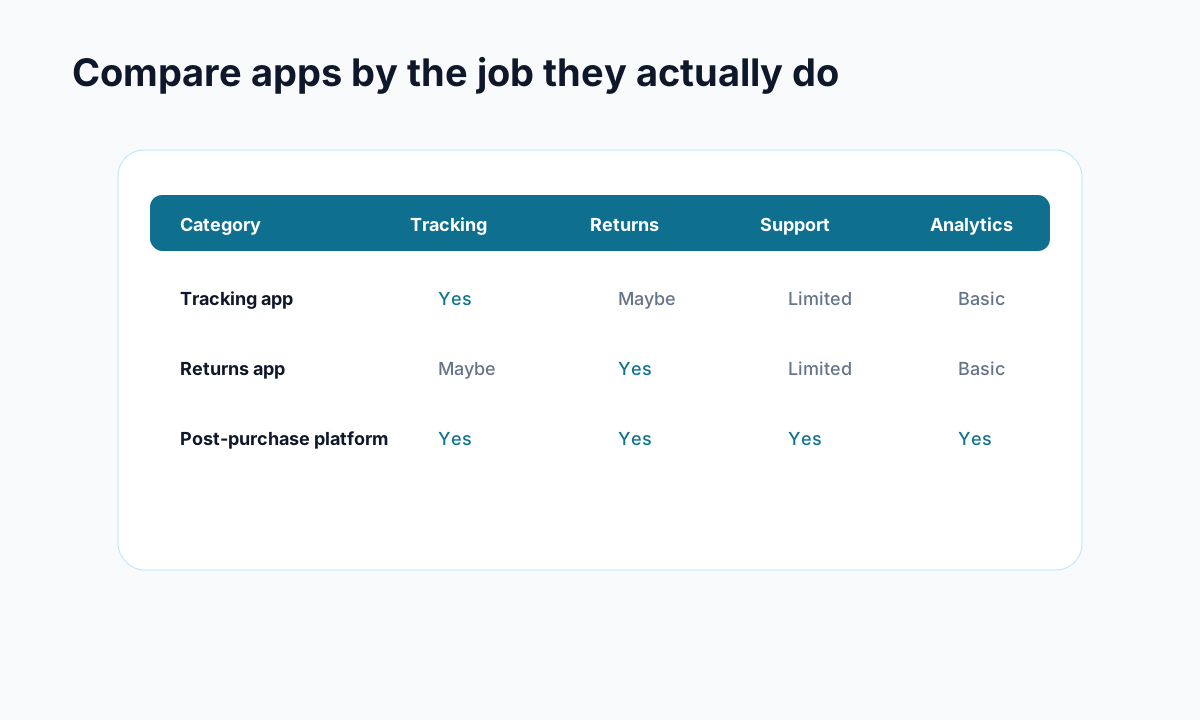
Example: compare apps by the operational jobs they cover, not by feature-page language.
Shopify has improved the thank you and order status experience, especially with newer customization options and UI extensions. You can review the official guidance in the Shopify Help Center and the Shopify developer docs.
Still, there are a few common gaps:
- limited branding depth for many stores
- weak handling of delivery exceptions
- no strong built-in workflow for self-serve support actions
- inconsistent experience when carriers or third-party tools are involved
That is why many merchants move beyond the default setup and treat the order status page as part support center, part retention surface.
A simple way to prioritize your Shopify order status page customization
If you want the shortest path to impact, do this in order:
- Improve tracking clarity
- Add help for delays and exceptions
- Keep branding consistent
- Make the experience mobile-friendly
- Add self-serve actions where they make sense
That sequence gets you most of the value without overcomplicating the project.
Final thoughts
Shopify order status page customization is easy to ignore because it lives after the sale. But that is exactly why it matters. This page shapes how customers feel while they wait, and waiting is where support costs and trust problems tend to show up.
If your current page only shows the bare minimum, start with clarity and reassurance. Then layer in self-serve support, better delay messaging, and stronger branding. Even modest improvements can lower ticket volume and make your store feel far more polished.
If you want to go further, platforms like Trexa can turn post-purchase into a more complete self-serve experience with branded tracking, returns, cancellations, and AI-assisted support. The important part is the principle: customers should not have to ask basic questions that your order status page could have answered for them.
Ready to reduce your support tickets?
Trexa gives your Shopify store AI-powered order tracking, automated support, and self-serve returns. Start free with 10 orders/month.
Start FreeExplore related Trexa pages