Shopify Support KPIs: 8 Metrics That Actually Matter
Track the Shopify support KPIs that reveal order anxiety, repeat contacts, weak deflection, and rising support cost.
Shopify support KPIs can be useful, but only if they tell you what is actually happening after checkout. A dashboard full of green numbers does not help much if customers still ask where their order is, return requests pile up, and repeat buyers quietly disappear.
Most stores start with the obvious metrics: first response time, tickets closed, and customer satisfaction. Those are fine, but they are incomplete. For Shopify support, the better question is: which metrics reveal friction your team can remove this week?
This guide covers the Shopify support KPIs worth tracking, the formula for each one, and how to turn the numbers into better post-purchase systems.
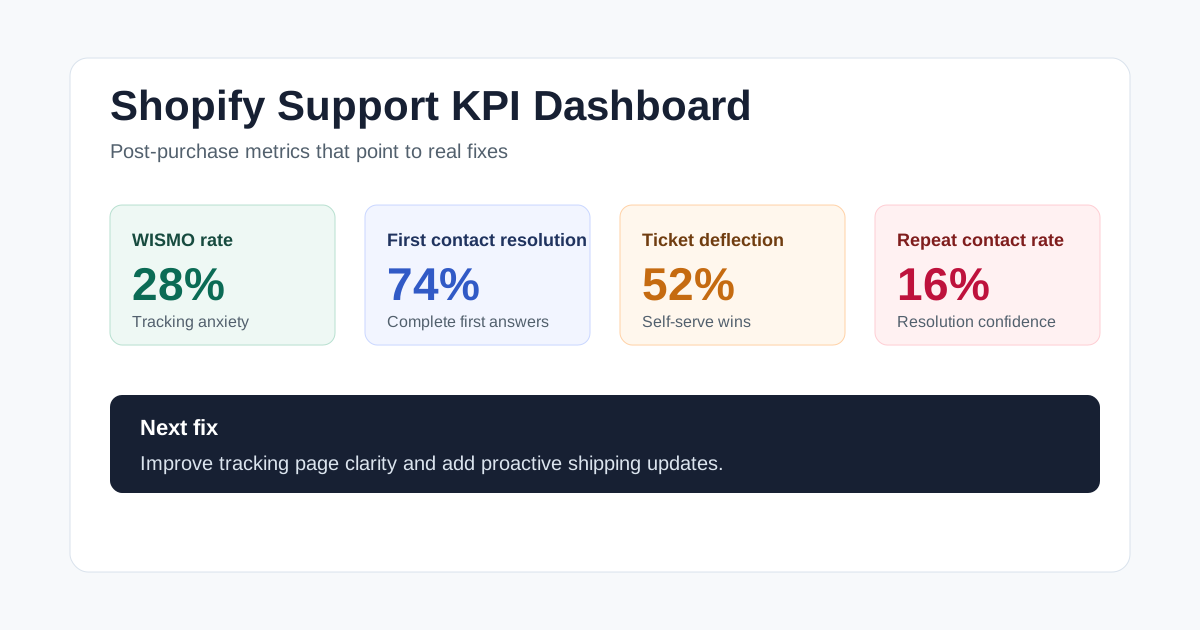
Visual guide: Shopify support KPI dashboard
Why Shopify support KPIs need post-purchase context
Generic customer service metrics treat every business the same. Shopify stores are different because a huge share of support volume comes from predictable post-purchase moments: order tracking, shipping delays, returns, exchanges, refunds, cancellations, damaged items, and policy questions.
That means your Shopify support KPIs should do more than measure agent activity. They should tell you which parts of the buying journey are creating avoidable tickets.
For example, a fast first response time looks good in a weekly report. But if 35% of your inbox is still made up of "where is my order?" messages, the real fix is not faster replies. The fix is better tracking, clearer shipping notifications, and a self-serve order page that customers trust.
Use the metrics below as a working scorecard. Do not track all of them just to feel thorough. Pick the three or four that match your current bottleneck, improve one process, then check whether the number moved.
1. WISMO rate
WISMO means "where is my order?" It is one of the cleanest Shopify support KPIs because it points directly at a post-purchase gap.
Formula: WISMO tickets / total support tickets x 100
If WISMO is high, customers are not getting enough confidence from your tracking page, shipping emails, or delivery updates. That does not always mean your carrier is slow. Often it means the customer cannot easily see what is happening.
Track WISMO weekly and tag the root cause when you can:
- No tracking number yet
- Tracking number exists but has not updated
- Carrier delay
- Delivered but not received
- Customer missed the shipping email
Once you know the pattern, the fix becomes clearer. A branded tracking page can reduce simple status questions, while proactive email updates can prevent customers from opening a ticket in the first place. For a deeper breakdown, read Trexa's guide to what WISMO means for Shopify stores.
2. First contact resolution rate
First contact resolution, or FCR, measures how often a customer gets a complete answer the first time they reach out.
Formula: tickets resolved in one interaction / total resolved tickets x 100
FCR matters because customers do not care that you replied quickly if the reply sends them into a second, third, or fourth message. For Shopify stores, low FCR usually comes from missing order context. The agent or chatbot cannot see shipment status, return eligibility, product details, or the customer's previous messages.
To improve it, give support the information needed to finish the job in one reply. That might mean connecting your help desk to Shopify, adding clearer macros, or using self-serve flows for returns and cancellations.
3. Ticket volume by category
Ticket volume is too broad on its own. Ticket volume by category is useful because it turns your inbox into a product roadmap for customer experience.
Formula: tickets in category / total support tickets x 100
Start with simple categories:
- Order tracking
- Returns and exchanges
- Cancellations
- Refund status
- Product questions
- Damaged, missing, or incorrect items
- Subscription or account issues
The goal is not perfect taxonomy. The goal is to spot repeated friction. If returns make up 24% of your tickets, customers may not understand your policy or may not have a clear return portal. If cancellations spike right after purchase, your confirmation flow may be missing a simple self-serve option.
This is also where support data becomes growth data. Every repeated ticket category is a place where the store can remove uncertainty before it turns into a complaint.
4. Ticket deflection rate
Ticket deflection measures how many customer questions are resolved without a human agent.
Formula: self-served or automated resolutions / total support questions x 100
This is one of the most important Shopify support KPIs for small teams, but it is also easy to misuse. A high deflection rate is only good if customers actually get accurate answers. If a bot blocks customers from reaching a human, deflection becomes a vanity metric.
Track deflection alongside repeat contact rate and CSAT. If deflection rises while repeat contacts also rise, your automation is probably answering too shallowly. If deflection rises and repeat contacts fall, the self-serve experience is doing its job.
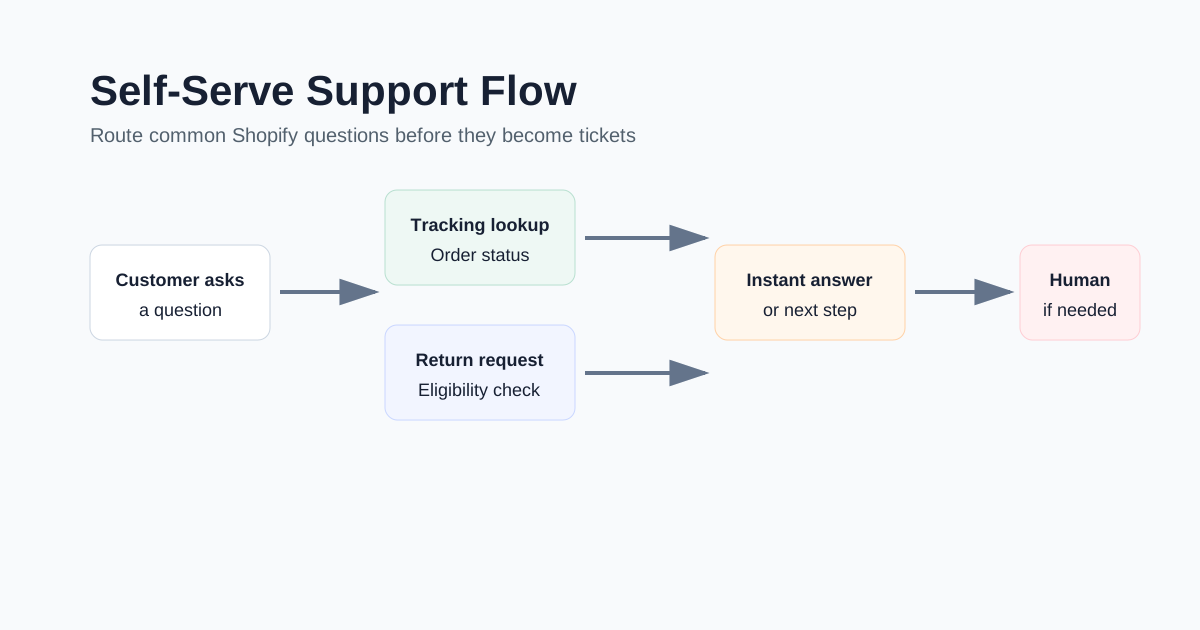
Tools like Trexa can help here by combining branded order tracking, self-serve returns, cancellations, and an AI assistant trained on store policies. The point is not to hide support. The point is to solve the repetitive questions before they hit the inbox.
Visual guide: self-serve support flow
5. Repeat contact rate
Repeat contact rate catches the problems that first response time misses.
Formula: customers who contact again about the same issue within 7 to 14 days / resolved tickets x 100
A customer who writes back three days later with "any update?" is telling you the first answer did not create confidence. Maybe the reply was vague. Maybe the ticket was closed too early. Maybe the customer needed a status page, not another email.
Audit repeat contacts every month. Look for clusters by issue type, carrier, product, return reason, or policy. Then fix the process, not just the individual ticket.
6. Average resolution time by issue type
Average resolution time is useful, but only when segmented.
Formula: total time to resolve tickets in a category / number of resolved tickets in that category
Your average may look fine while one issue type is causing real pain. A product question might take 8 minutes. A damaged item claim might take 3 days because your team has to ask for photos, check inventory, approve a replacement, and send a new tracking number.
Segmenting resolution time helps you find workflow problems. If returns take too long, the fix may be an eligibility rule or return portal. If cancellations take too long, the fix may be instant cancellation before fulfillment starts. If delivery issues take too long, the fix may be clearer escalation rules for each carrier.
Shopify's own customer service KPI guide is a useful primer on common metrics like CSAT, first response time, and resolution rate, but your store still needs issue-level reporting to make those numbers actionable.
7. Customer satisfaction after support
CSAT tells you how customers felt after an interaction.
Formula: satisfied responses / total survey responses x 100
Send the question right after a chat, email, return request, or cancellation flow. Keep it simple. A one-click rating plus an optional comment will get more responses than a long survey.
CSAT is most useful when paired with tags. "CSAT fell from 86% to 79%" is interesting. "CSAT fell to 79% for return requests after we shortened the return window" is useful.
For public benchmark context, the American Customer Satisfaction Index tracks online retail satisfaction trends, and Shopify has published practical customer service KPI examples. Use benchmarks as orientation, not as the final goal. Your best benchmark is your own trend line.
8. Support cost per order
Cost per resolution is a common support metric, but Shopify stores should also watch support cost per order.
Formula: total support cost / number of orders
This connects support effort to order volume. If sales double and support cost per order stays flat or falls, your systems are scaling. If support cost per order rises as you grow, your post-purchase experience is becoming more expensive with every new customer.
Include software, labor, and outsourced support when calculating the number. It will not be perfect, but it will show direction. Pair it with Shopify customer service cost to understand whether the team is solving preventable work or genuinely complex issues.
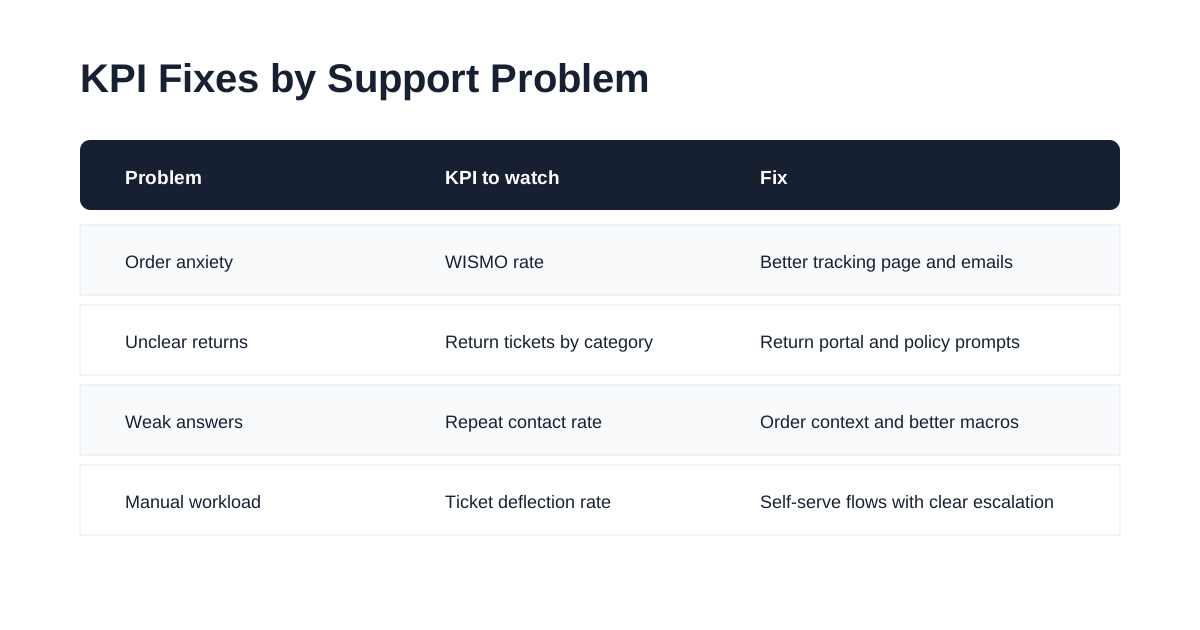
Visual guide: KPI fixes by support problem
A simple Shopify support KPI dashboard
If you want a practical starting point, build a weekly dashboard with these seven rows:
| KPI | What it tells you | Review cadence |
|---|---|---|
| WISMO rate | Tracking and delivery anxiety | Weekly |
| Ticket volume by category | Where customers get stuck | Weekly |
| First contact resolution | Whether answers are complete | Weekly |
| Repeat contact rate | Whether resolutions hold up | Weekly |
| Ticket deflection rate | Whether self-service is working | Weekly |
| CSAT after support | Whether customers felt helped | Monthly |
| Support cost per order | Whether support scales with growth | Monthly |
Keep the dashboard boring. The value is not in the chart. The value is in the decision it forces.
Each week, ask three questions:
- Which category created the most avoidable tickets?
- Which metric got worse?
- What one workflow can we improve before next week?
That rhythm beats a giant dashboard nobody uses.
Turn Shopify support KPIs into better systems
The best Shopify support KPIs do not just describe your inbox. They show you what to fix in the store.
High WISMO means tracking needs work. Low first contact resolution means support lacks context. High repeat contact rate means customers are not leaving the first answer confident. High support cost per order means your post-purchase systems are not scaling cleanly.
Start with the metrics tied closest to your current pain. Then improve the customer-facing flow: tracking pages, shipping emails, return portals, cancellation rules, and support handoffs. When those systems get better, the dashboard follows.
Ready to reduce your support tickets?
Trexa gives your Shopify store AI-powered order tracking, automated support, and self-serve returns. Start free with 10 orders/month.
Start FreeExplore related Trexa pages