Shopify Self-Serve Returns: Setup Guide for 2026
A practical guide to Shopify self-serve returns in 2026, including setup steps, common limitations, and the best ways to reduce return-related support work.
Shopify Self-Serve Returns: Setup Guide for 2026
If you're looking into Shopify self-serve returns, you're probably dealing with the same problem most merchants hit sooner or later. Returns eat support time, customers want quick answers, and a messy process quietly chips away at repeat purchases.
The good news is that Shopify now gives merchants a native way to let customers request returns on their own. The less good news is that the default setup is still pretty limited. It works, but only if your store has simple return rules and your team does not mind manual review.
In this guide, I'll walk through how Shopify self-serve returns work, how to set them up, where the limitations show up, and when you should stick with the native flow versus using a more flexible post-purchase tool.
<!-- trexa-visual-elements:start -->Visual guide: self-serve returns setup path
Self-serve returns work best when eligibility, policy language, and customer next steps are clear before the request starts.
| Setup step | What to configure | Why it matters |
|---|---|---|
| Customer accounts | Give customers a place to request returns. | Reduces email back-and-forth. |
| Return rules | Define windows, fees, and exclusions. | Prevents ineligible requests. |
| Support path | Explain edge cases and next steps. | Keeps exceptions from becoming messy tickets. |
Helpful reference:
<!-- trexa-visual-elements:end -->What Shopify self-serve returns actually do
<!-- trexa-section-visual:returns -->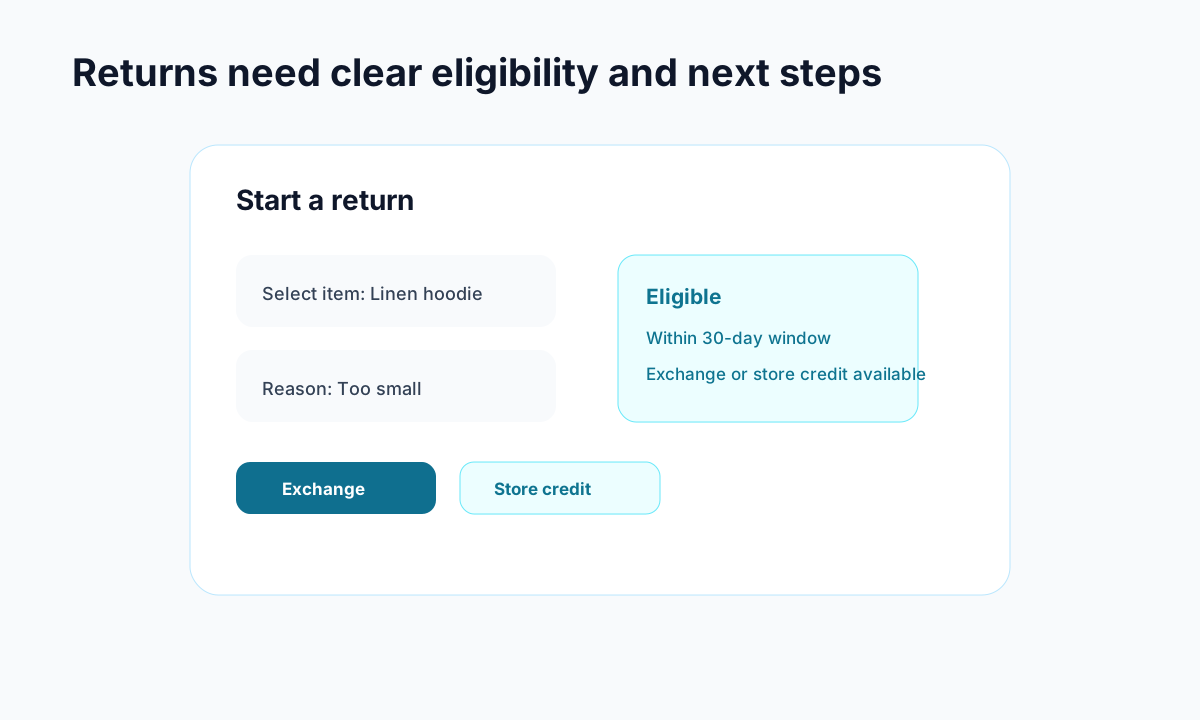
Example: a return flow should show eligibility and resolution options before a customer emails support.
Shopify self-serve returns let customers log into their account, open an order, and submit a return request without emailing your team first. That alone removes a lot of back and forth.
At a basic level, the native flow gives you a few useful things:
- Customers can start a return from their order history
- Return reasons are collected in a structured format
- Your team can approve or decline requests in Shopify admin
- Shopify can send return-related emails during the process
- Return rules can control some basic eligibility
For smaller stores, that is already a meaningful upgrade over handling every return by inbox.
If your store still gets a lot of "where is my order" traffic too, it is worth pairing returns with a better post-purchase support flow. Related guides on what WISMO means and why it gets expensive and how branded tracking pages reduce support pressure are worth a read.
How to set up Shopify self-serve returns
Setting up the native return request flow is fairly simple, but there are a couple of prerequisites that trip people up.
1. Switch to the new customer accounts experience
Self-serve returns only work with Shopify's newer customer accounts, not the classic version. In your Shopify admin, go to Settings > Customer Accounts and make sure the new experience is enabled.
This matters because the return request flow lives inside the customer account area. If you are still on legacy accounts, your customers will not see the option.
2. Turn on self-serve returns
Once the new account experience is active, find the self-serve returns setting and enable it. Shopify's help docs walk through the exact steps here:
After you save the setting, customers can request returns from eligible orders in their account.
3. Set your return rules
Before you send customers into the flow, make sure your rules are clean. Decide:
- How many days customers have to request a return
- Which items are excluded, such as final sale or personalized products
- Whether return shipping is free, paid, or conditional
- Whether exchanges are allowed
The native setup is good enough for straightforward policies. If your rules vary by product type, order tag, VIP status, or warehouse logic, things get clunky fast.
4. Make the return path obvious
A self-serve feature only reduces tickets if customers can actually find it.
Add a clear link to customer accounts from your header, footer, return policy page, and post-purchase emails. You do not want shoppers emailing support simply because they never found the return option.
This is the same principle behind a good tracking experience. When you make the next step obvious, support volume drops. That is one reason we recommend tightening both your returns and Shopify order status page customization.
Where Shopify self-serve returns fall short
Here is where most merchants hit friction. The native flow is useful, but it is still a request system, not a fully automated returns operation.
Shopify self-serve returns still need manual approval
This is the biggest limitation.
Customers can submit return requests, but your team usually still needs to review and approve them. That means you are saving some inbox work, but you are not truly removing operational load.
If your store handles a meaningful return volume, manual review becomes a bottleneck during busy weeks, sale periods, and holiday spikes.
Customization is limited
Competitor content keeps pointing this out, and they are right. The native return flow lives inside Shopify's customer account experience, which gives you less control over branding and layout than many merchants want.
That may be fine for a simple setup, but it is not ideal if your post-purchase experience is part of your retention strategy.
Advanced policies are harder to enforce
If your rules are something like "30 days for regular items, 14 days for sale items, exchange only for certain categories, bonus store credit for specific SKUs," the default setup starts feeling thin.
You can absolutely run the native return flow with broad rules. It just gets awkward when real-world exceptions pile up.
Store credit and automation are limited
Many merchants want to push exchanges or store credit before cash refunds because it protects revenue. Native Shopify returns are improving, but most stores still need more flexibility around:
- instant store credit
- automatic approvals
- photo uploads
- custom routing rules
- better analytics on return reasons
That gap shows up in both third-party writeups and merchant discussions around the feature.
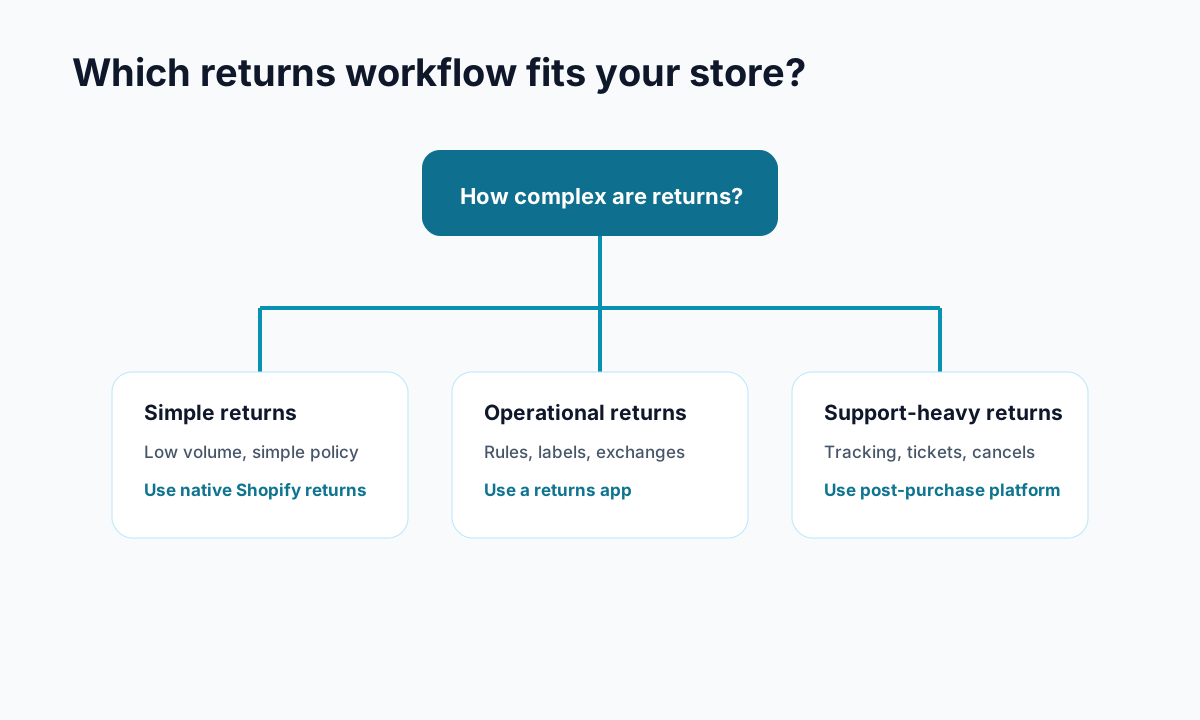
When Shopify self-serve returns are enough
I think the native option is a solid fit when your store matches most of these conditions:
- You have low to moderate return volume
- Your policy is simple and easy to explain
- Your team can handle manual approvals quickly
- You do not need heavy branding or workflow customization
- You mostly want to stop basic return request emails
For a newer store, that can be plenty. Getting from email chaos to a clean request flow is real progress.
When you need something more flexible
You will probably outgrow the native setup if:
- returns are a major support category
- you want automated approvals
- you want to offer store credit incentives
- you need more branded post-purchase flows
- you need better reporting and operational control
This is where tools built around post-purchase support can help. For example, platforms like Trexa focus on reducing support load across tracking, returns, cancellations, and customer messaging in one place instead of treating each workflow as a separate patch.
That matters because returns rarely happen in isolation. The same customer who requests a return might also ask about delivery timing, exchange status, or cancellation windows. When those experiences are fragmented, ticket volume creeps right back up.
Best practices for Shopify self-serve returns in 2026
<!-- trexa-section-visual:comparison -->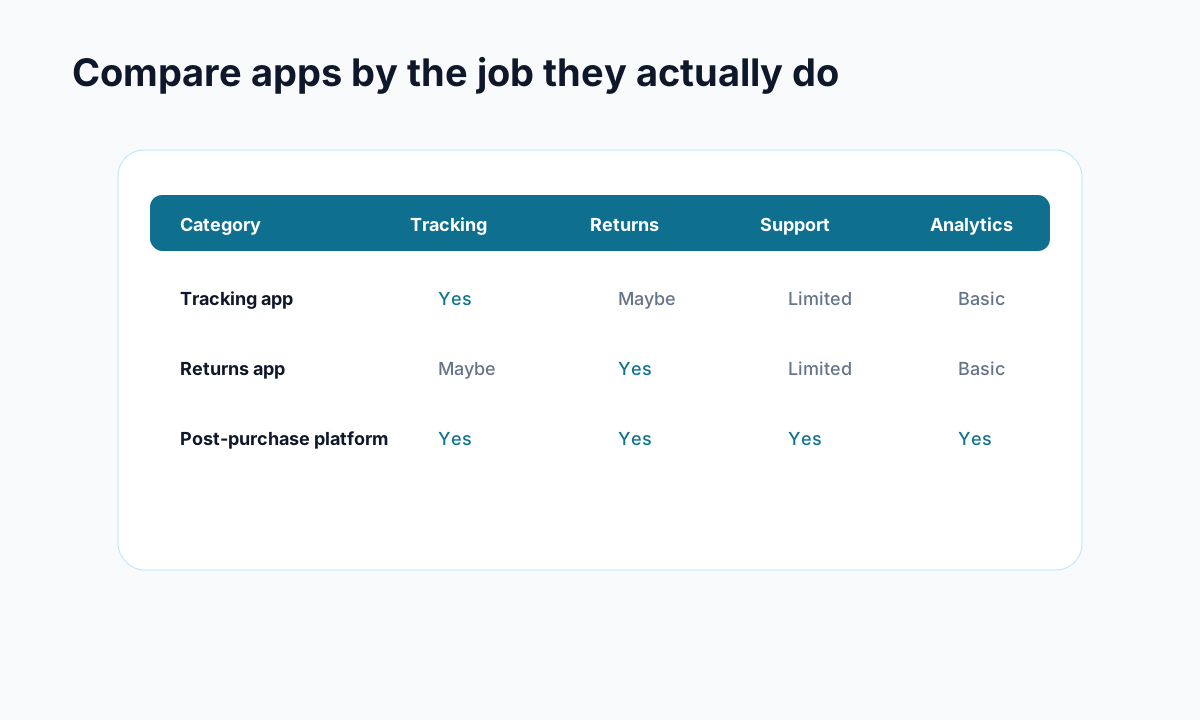
Example: compare apps by the operational jobs they cover, not by feature-page language.
If you do turn on the feature, these are the habits worth keeping:
Keep your policy simple
If a customer needs to read your return policy three times, it is too complicated. Use plain language and make the rules visible before purchase and after delivery.
Set expectations early
Tell customers where to start a return, how long approval takes, and when refunds are issued. Clarity prevents angry follow-up emails.
Watch for repeat return reasons
Structured return reasons are only useful if you act on them. If one product gets repeated complaints about sizing, quality, or misleading photos, fix the source instead of just processing the fallout.
Pair returns with better tracking communication
A surprising number of return requests are actually delivery anxiety, confusion, or impulse reactions while the order is still in motion. Better tracking updates and a cleaner order status page reduce that noise before it becomes a refund request.
Review manual workload monthly
Native returns often look efficient at first, then quietly create an admin queue. Track how many requests still need human review and how long they sit. If that number keeps climbing, the tool is no longer saving enough time.
Final take on Shopify self-serve returns
Shopify self-serve returns are worth enabling for many stores in 2026. They are easy to turn on, better than handling returns by inbox, and useful for merchants with straightforward policies.
But they are not a complete returns system. If your store needs automation, stronger branding, exchange-first workflows, or lower support overhead, you will hit the limits pretty quickly.
Start with the native setup if it fits your business today. If you want a more complete post-purchase experience across tracking, returns, and support, Trexa is built for that next step without forcing customers into a messy handoff.
Ready to reduce your support tickets?
Trexa gives your Shopify store AI-powered order tracking, automated support, and self-serve returns. Start free with 10 orders/month.
Start FreeExplore related Trexa pages