Shopify AI Chatbot: What It Should Handle in 2026
A practical guide to choosing a Shopify AI chatbot that can handle tracking, returns, cancellations, and clean support handoffs.

A Shopify AI chatbot is only useful if it can answer the questions your team gets every day: where is my order, how do I return this, can I cancel, and why has my shipment stopped moving? Product recommendations are nice. Pretty chat widgets are nice. But for most growing Shopify stores, the real support cost sits after checkout.
The trick is knowing the difference between a chatbot that repeats your FAQ and one that can actually work with order data, return rules, and escalation notes. This guide walks through what a Shopify AI chatbot should handle, what it should hand to a human, and how to judge whether a tool will reduce tickets without creating messy customer experiences.
What a Shopify AI chatbot should actually do
A decent Shopify AI chatbot starts with live store context. If a customer asks about order #1048, the answer should come from the actual order record, not from a generic "check your email" script. That means the tool needs access to fulfillment status, carrier tracking, order date, customer identity, and any relevant support history.
That basic data layer changes the quality of the conversation. A customer does not want to know your average shipping time after they already bought. They want to know whether their specific package has shipped, where it is, and what happens next if the carrier has not updated in four days.
The same rule applies to returns and cancellations. Shopify's own docs describe self-serve returns and cancellations as a way for customers to request returns or cancel unfulfilled items directly from the storefront or order status flow. That is the right direction, but a chat layer can make the experience clearer by explaining eligibility, collecting context, and routing only the exceptions to your team. Shopify's documentation on self-serve returns and cancellations is a useful baseline for what customers expect now.
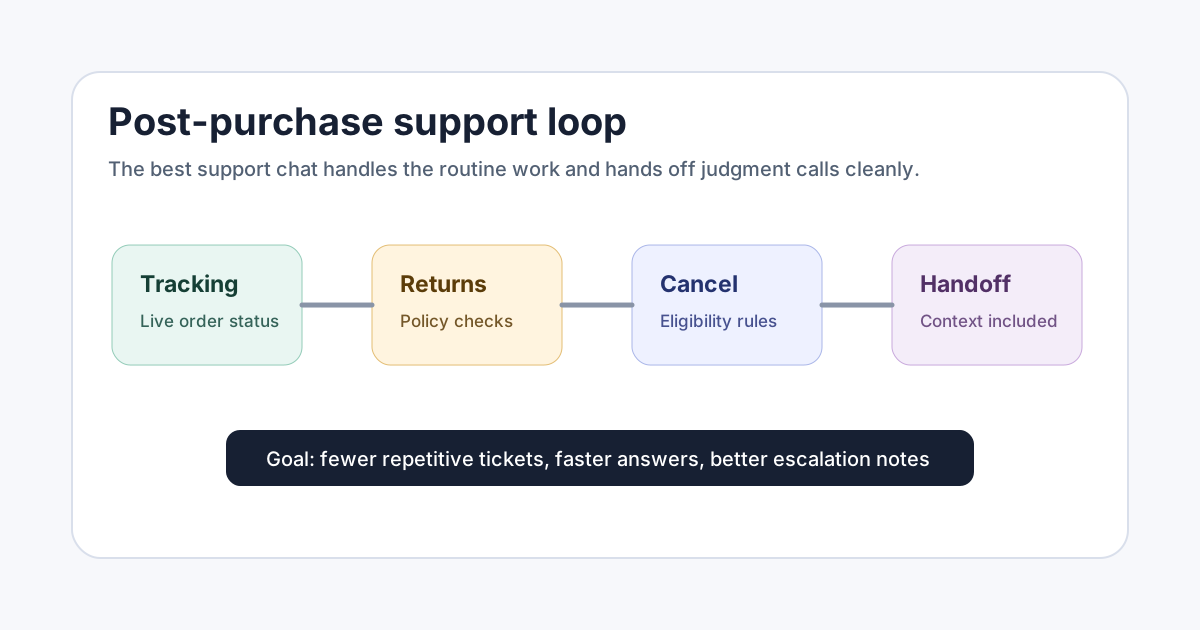
For post-purchase support, the core jobs are simple:
- Answer WISMO questions with live order and tracking details
- Explain return eligibility from the current policy
- Identify whether an order can still be cancelled
- Collect the reason for a return, cancellation, or complaint
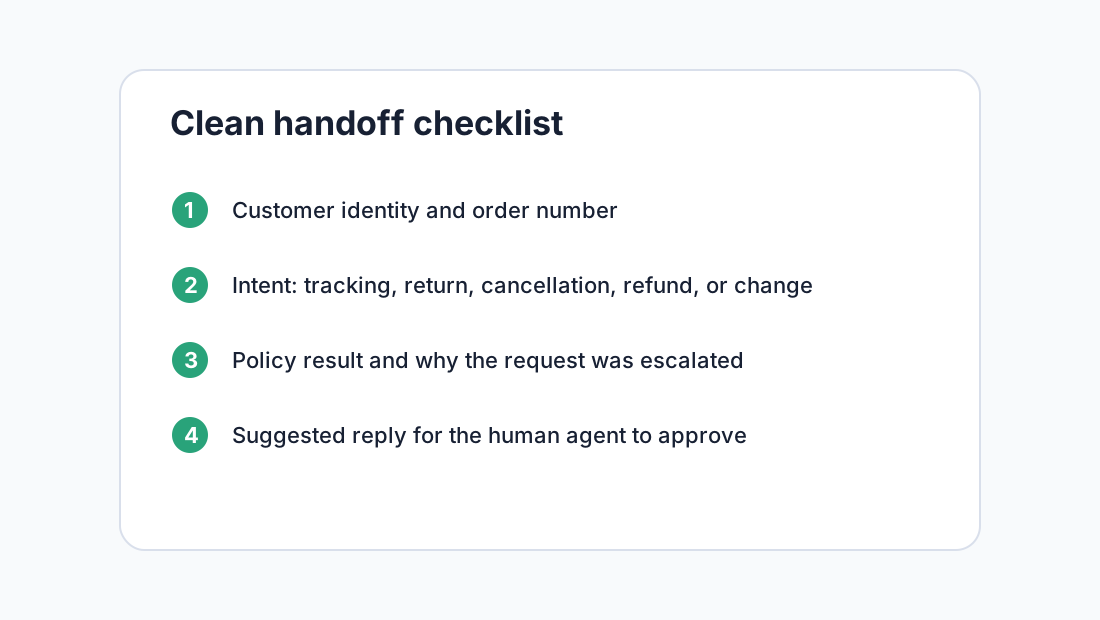
- Send edge cases to a human with the right context attached
If a tool cannot do those jobs cleanly, it will not make a real dent in support volume.
Shopify AI chatbot use cases after checkout
The best Shopify AI chatbot use cases are boring in a good way. They are repetitive, rules-based, and high volume. That makes them perfect for automation because the answer usually comes from data or policy rather than judgment.
Order tracking is the easiest place to start. Your team should not spend five minutes copying carrier links into emails. A chatbot can identify the customer, find the order, summarize the fulfillment status, and link to a branded tracking page. If the shipment looks delayed, it can explain the next step instead of pretending everything is fine.
Returns are the second major win. Customers usually ask two things: "Can I return this?" and "How do I start?" The chatbot should check the return window, product exclusions, item condition rules, and whether the order has already been refunded or replaced. If the request fits your policy, it can guide the customer to the next step. If it does not, it can explain why without dumping policy text into the chat.
Cancellations need speed. If an order is unfulfilled, a fast answer can prevent a chargeback, an angry email, or a package that ships only to come back later. A chatbot should check fulfillment status, explain your cancellation window, and escalate urgent requests with order details already attached.
Support handoff matters more than most vendors admit. A chatbot that says "I'll get a human" without capturing the order number, issue, policy result, and customer expectation has only moved the work around. A good handoff saves your agent the first two replies.
How to choose a Shopify AI chatbot without getting fooled
Vendors love big automation numbers. The problem is that "deflection," "containment," and "resolution" often mean different things. One tool may count a ticket as handled when the customer leaves the chat. Another may count only issues that were fully solved without a human. That difference matters.
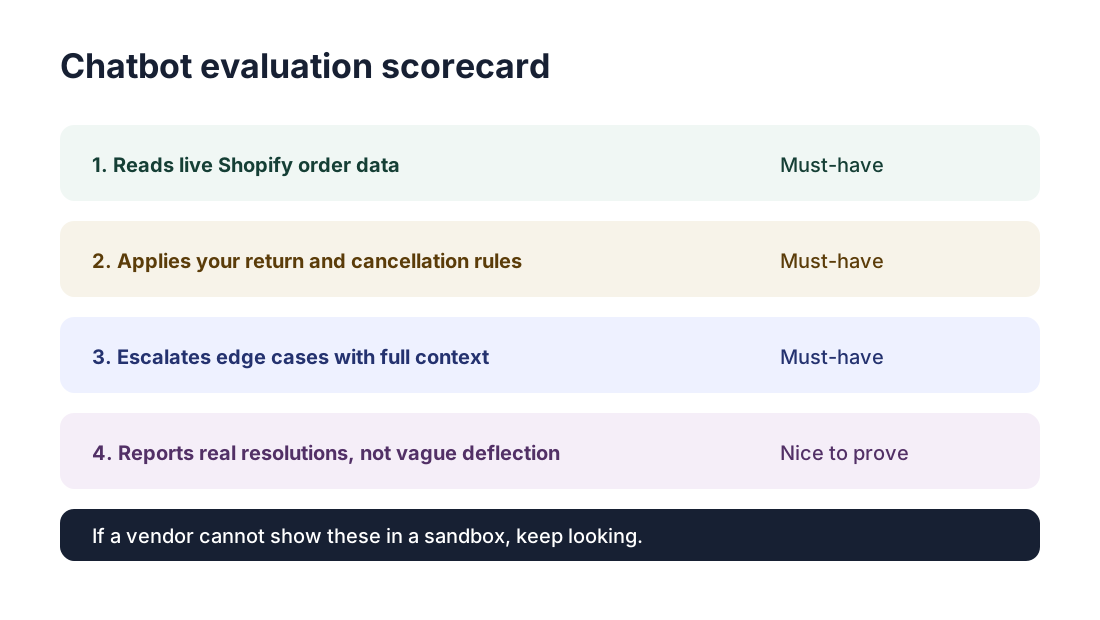
When you evaluate a Shopify AI chatbot, ask for proof around four areas.
First, ask what Shopify data it can read. Order status is the minimum. Useful tools can also see customer details, fulfillment events, product data, return status, and past conversations.
Second, ask what actions it can take. Some stores only want the chatbot to answer and route. Others want it to trigger a return flow, draft a refund response, or cancel eligible unfulfilled orders. Neither setup is automatically better. What matters is that you decide where the line is before customers hit it.
Third, ask how it learns your policies. Uploading a dusty FAQ page is not enough. Your return window, shipping cutoff, warranty rules, final sale exclusions, and support tone all need to be current. If your policies change before Black Friday, the answers should change too.
Fourth, ask for a sandbox test. Give the vendor real scenarios: a delayed package, a final-sale return request, a cancellation after fulfillment, and a customer who gives the wrong email. Watch what happens. If the demo falls apart there, production will not be kinder.
Fin's 2026 comparison of Shopify support agents highlights similar evaluation points, including Shopify integration depth, resolution capability, channel coverage, security, and pricing model. You do not need to copy their shortlist, but those criteria are a practical way to separate serious tools from chat widgets with new packaging.
Shopify AI chatbot setup: the practical rollout
Do not roll out automation everywhere on day one. Start with the ticket categories that have clear answers and low downside.
Begin with tracking. Connect Shopify order data, carrier status, and your tracking page. Write plain-language responses for shipped, unfulfilled, out for delivery, delivered, delayed, and no tracking yet. This should reduce the classic WISMO queue and pairs naturally with a branded order tracking page.
Next, add returns. Map the policy rules that decide whether a return is eligible: window, product type, sale status, condition, exchange option, refund method, and store credit bonus if you offer one. If you already have a Shopify returns portal, the chatbot can become the front door that explains the rules before sending customers into the portal.
Then add cancellations. Define the cutoffs clearly. For example: unfulfilled orders can be cancelled automatically, partially fulfilled orders need review, and shipped orders should move into a return flow. The chatbot does not have to make every decision. It just needs to make the easy decisions quickly and hand off the rest.
Finally, review transcripts weekly. Look for answers that feel too vague, intents that get misclassified, and escalations that lack context. Your first version will not be perfect. That is fine. The goal is steady ticket reduction without hiding customer frustration.
What not to automate with a Shopify AI chatbot
Some requests should stay human by default. Payment disputes, chargeback threats, damaged high-value items, fraud concerns, and angry customers who have already contacted support twice deserve judgment. A chatbot can gather context, but it should not improvise policy exceptions.
You should also be careful with refunds. Automatic refunds can work for clear, low-risk cases, but only after you define the rules tightly. For example, a return request inside the window for an unused item might be safe to approve. A refund request for a delivered order with no photo, no return, and a history of prior refunds is different.
This is where tools like Trexa fit well for stores that want post-purchase automation without turning every support flow into a black box. A setup can combine branded tracking, guided returns, cancellations, and AI-drafted replies while still letting humans approve the moments that need judgment.
The better mental model is not "replace support." It is "stop making humans answer questions software can answer better." Your team should spend time on exceptions, recovery, and customer relationships. The chatbot should handle the repetitive path that customers never wanted to wait for anyway.
Final take
A Shopify AI chatbot can reduce support tickets, but only when it is built around real post-purchase work. Look past the chat bubble. Check the data access, policy handling, action limits, handoff quality, and reporting.
If the tool can answer tracking questions, guide returns, handle cancellation rules, and escalate cleanly, it can save real hours every week. If it only paraphrases your FAQ, it will add another surface for customers to get stuck.
Start with one high-volume flow, measure resolved tickets, and tighten the edge cases before expanding. For Shopify stores with growing post-purchase volume, that is the difference between helpful automation and another support channel to manage. Solutions such as Trexa are worth considering when you want tracking, returns, cancellations, and support context in one post-purchase flow.
Ready to reduce your support tickets?
Trexa gives your Shopify store AI-powered order tracking, automated support, and self-serve returns. Start free with 10 orders/month.
Start FreeExplore related Trexa pages