Ecommerce Customer Support Automation: A Practical Guide
Most ecommerce support tickets are repetitive questions with data-driven answers. Here's how to automate the right ones — and when to keep humans in the loop.
Ecommerce Customer Support Automation: A Practical Guide
If you're running a Shopify store, you already know the support math doesn't scale. More orders means more "where is my order?" emails, more return requests, more cancellations — and eventually, more full-time agents.
Ecommerce customer support automation is how growing stores break that cycle. Not by replacing human support entirely, but by letting customers handle the simple stuff themselves — so your team can focus on the problems that actually need a person.
Here's how to think about it, what to automate first, and what to leave alone.
<!-- trexa-visual-elements:start -->Visual guide: what to automate first
Automation should start with repetitive, low-risk post-purchase questions before touching sensitive edge cases.
| Work type | Automation level | Example |
|---|---|---|
| Repetitive status questions | Self-service | Tracking page and AI answer. |
| Policy questions | AI-assisted | Draft based on store policy. |
| Refund disputes | Human-led | Escalation with full context. |
Why Support Tickets Scale Faster Than Revenue
<!-- trexa-section-visual:support -->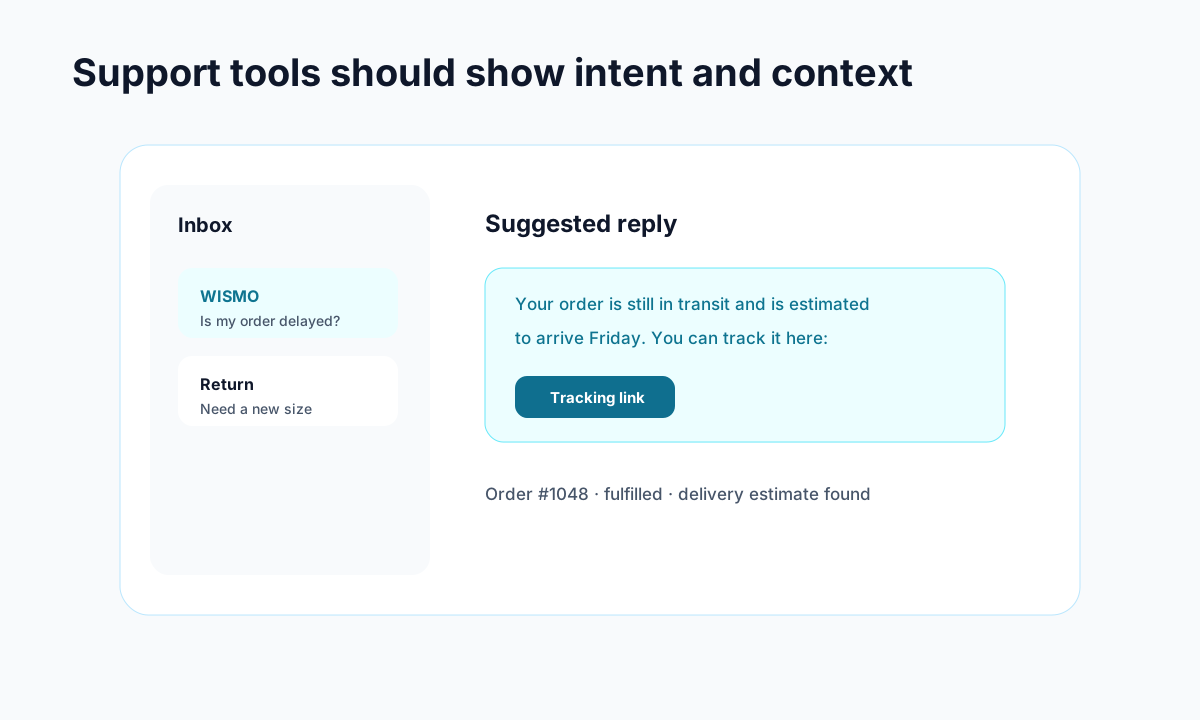
Example: support gets faster when intent, order context, and draft replies live together.
The average Shopify store generates roughly 88 support tickets for every 100 orders, according to industry data. At $5–9 per ticket, that's $440–$800 in support costs for every 100 orders — costs that climb linearly while your margins stay flat.
The worst part? Most of these tickets are repetitive. Studies consistently show that 40–50% of ecommerce support volume is WISMO ("where is my order?") and other order status questions. Another 15–20% is returns and cancellations. That's over half your support load asking questions that have straightforward, data-driven answers.
When you understand what WISMO actually costs, the case for automation becomes obvious. It's not about cutting costs for the sake of it — it's about stopping your support team from answering the same five questions hundreds of times a month.
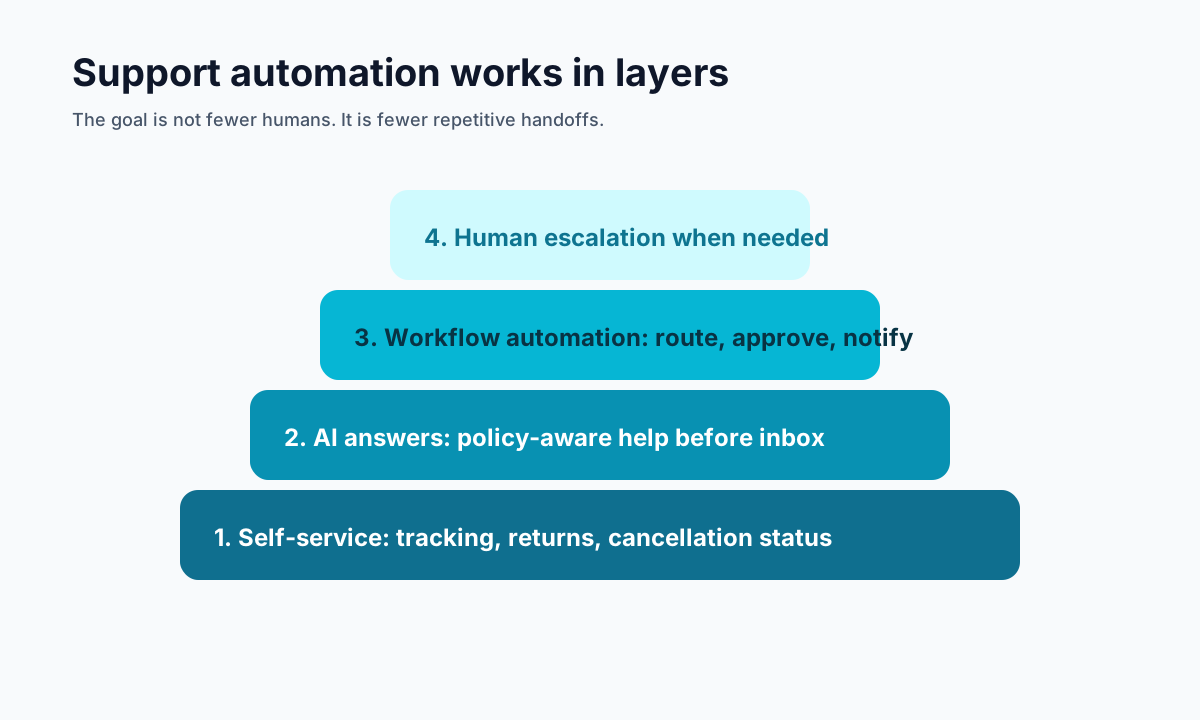
The Three Layers of Support Automation
Not all automation is created equal. Think of it in three layers:
Layer 1: Self-Service (Deflect Before Contact)
This is the highest-ROI move. Give customers the information they're looking for before they write to you:
- Branded order tracking pages — A single page where customers check shipment status themselves. This alone can deflect 30-50% of WISMO tickets.
- Self-serve returns portals — Let customers initiate returns and print labels without emailing your team.
- FAQ and knowledge base — Cover your top 10 questions in a searchable, easy-to-find format.
Self-service channels cost $1–4 per interaction compared to $8–17 for human-assisted channels. The math is simple.
Layer 2: AI-Assisted Responses (Handle Routine Questions)
For customers who do reach out, AI can handle the first response — and often the entire conversation — for common questions:
- AI chatbots trained on your store's policies answer shipping, returns, and product questions instantly
- AI-drafted email replies let agents review and send in seconds instead of typing from scratch
- Smart routing sends complex issues to the right person immediately
The key here is training your AI on your actual policies, not generic responses. An AI assistant that knows your return window is 30 days and your free shipping threshold is $75 is genuinely useful. One that gives vague, corporate non-answers just frustrates people.
Some Shopify apps take this approach — using your store's actual policies and order data to power AI responses on your tracking page, so customers get real answers without waiting for an agent.
Layer 3: Workflow Automation (Eliminate Manual Steps)
The behind-the-scenes automation that saves your team hours every week:
- Auto-tagging and prioritization — Categorize tickets by intent (shipping, returns, billing) automatically
- Auto-approval rules — Approve returns under a certain value or within a time window without human review
- Proactive notifications — Email customers about shipping delays before they ask, cutting WISMO tickets at the source
- Escalation rules — If an AI can't resolve it in two exchanges, hand off to a human with full context
What to Automate First (Priority Order)
If you're just getting started, don't try to automate everything at once. Focus on the highest-volume, lowest-complexity tickets first:
- Order tracking — This is your single biggest ticket driver. A branded tracking page eliminates most of these overnight.
- Shipping notifications — Proactive emails at each shipping milestone (confirmed, shipped, out for delivery, delivered) reduce "where is my order?" before it happens.
- Returns initiation — A self-serve returns portal with clear eligibility rules handles 80% of return requests without agent involvement.
- Common FAQs — Shipping times, return policies, sizing guides. These are perfect for AI chatbots.
- Order cancellations — If a customer wants to cancel before shipment, an automated flow can handle it instantly.
What NOT to Automate
Automation works best when it knows its limits. Keep humans in the loop for:
- Angry or frustrated customers — Sentiment detection should flag these for human agents. Nothing makes a bad experience worse than a chatbot saying "I understand your frustration!"
- Complex product issues — Defects, allergic reactions, safety concerns need human judgment.
- High-value customers or orders — Your top 10% of customers deserve personal attention.
- Escalated complaints — If a customer has already tried self-service and failed, sending them back into a bot is a recipe for a one-star review.
The goal isn't zero human interaction. It's making sure humans spend their time on conversations that actually benefit from a human touch.
Measuring What Matters
Track these metrics to know if your automation is working:
- Ticket deflection rate — What percentage of customers resolve their issue without contacting support? Aim for 40%+ after implementing self-service.
- First response time — AI should respond in seconds, not hours.
- Resolution rate (automated) — What percentage of AI-handled conversations reach resolution without human takeover? 60–70% is a good benchmark.
- CSAT for automated interactions — If customer satisfaction drops, your automation is broken. Period.
- Cost per resolution — Not just cost per contact. Track how much it costs to actually solve the problem.
Start With the Obvious Wins
Ecommerce customer support automation isn't about building a robot army. It's about recognizing that half your tickets don't need a human to answer them — and giving customers faster, better options for those questions.
Start with a tracking page that actually works. Add self-serve returns. Train an AI on your real policies. Tools like Trexa combine branded tracking, AI chat, and self-serve returns in one package — but whatever you choose, the important thing is getting started. Watch your ticket volume drop while your customer satisfaction stays the same — or improves.
The stores that figure this out early don't just save money. They build a support experience that scales with them instead of against them.
Ready to reduce your support tickets?
Trexa gives your Shopify store AI-powered order tracking, automated support, and self-serve returns. Start free with 10 orders/month.
Start FreeExplore related Trexa pages