Shopify Order Tracking Guide: Best Practices for 2026
A practical Shopify order tracking guide covering native features, common gaps, and the best ways to reduce WISMO tickets in 2026.
Shopify Order Tracking Guide: Best Practices for 2026
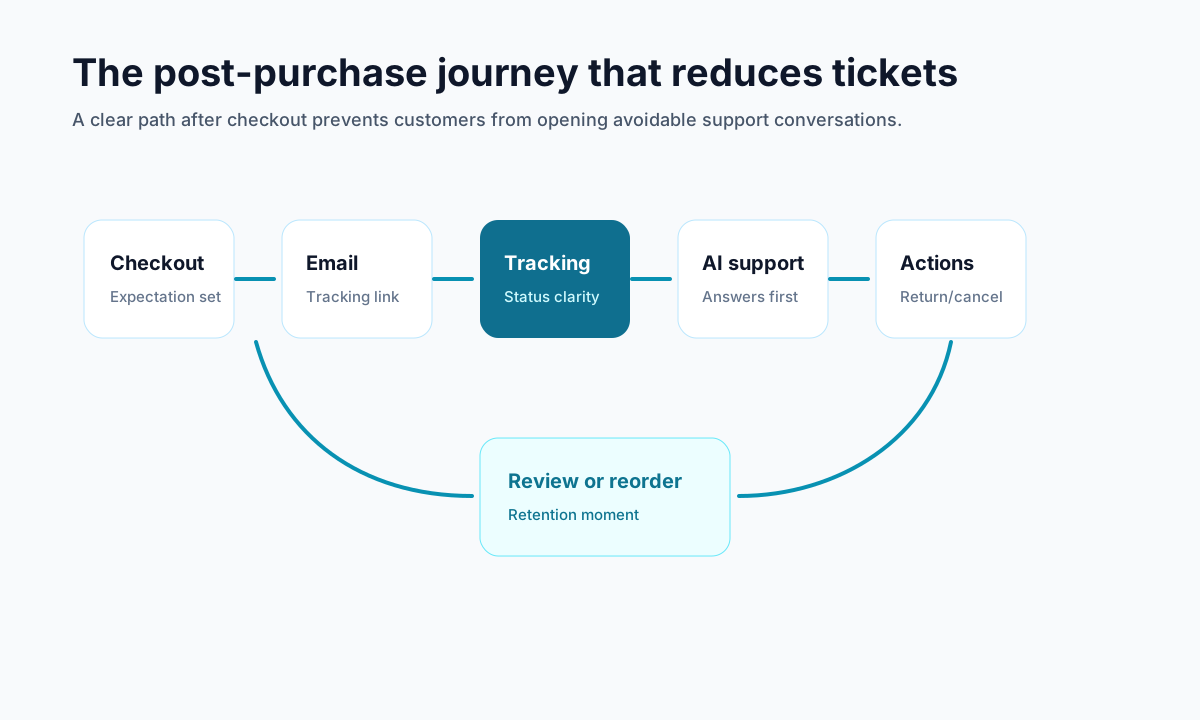
If customers keep emailing your store asking where their package is, you do not have an order tracking problem alone. You have a post-purchase communication problem.
A strong Shopify order tracking guide should help you do more than add a tracking number to an email. It should help you understand what customers expect after checkout, what Shopify handles natively, where those defaults fall short, and how to reduce WISMO tickets before they hit your support inbox.
In 2026, that matters more than ever. Shopify notes that customers expect clear, timely updates throughout fulfillment, while newer guides in the ecosystem increasingly separate order status from order tracking because they solve different customer questions. If your store is only answering one of those, customers will still end up contacting support.
<!-- trexa-visual-elements:start -->Visual guide: tracking maturity ladder
Order tracking improves in stages. Start with visibility, then add clarity, branding, and support actions.
| Stage | Setup | Outcome |
|---|---|---|
| 1 | Native Shopify order status. | Basic visibility. |
| 2 | Proactive shipping emails. | Fewer status questions. |
| 3 | Branded tracking page. | More trust and control. |
| 4 | Tracking connected to support actions. | Ticket reduction. |
What a Shopify order tracking guide should actually cover
<!-- trexa-section-visual:order -->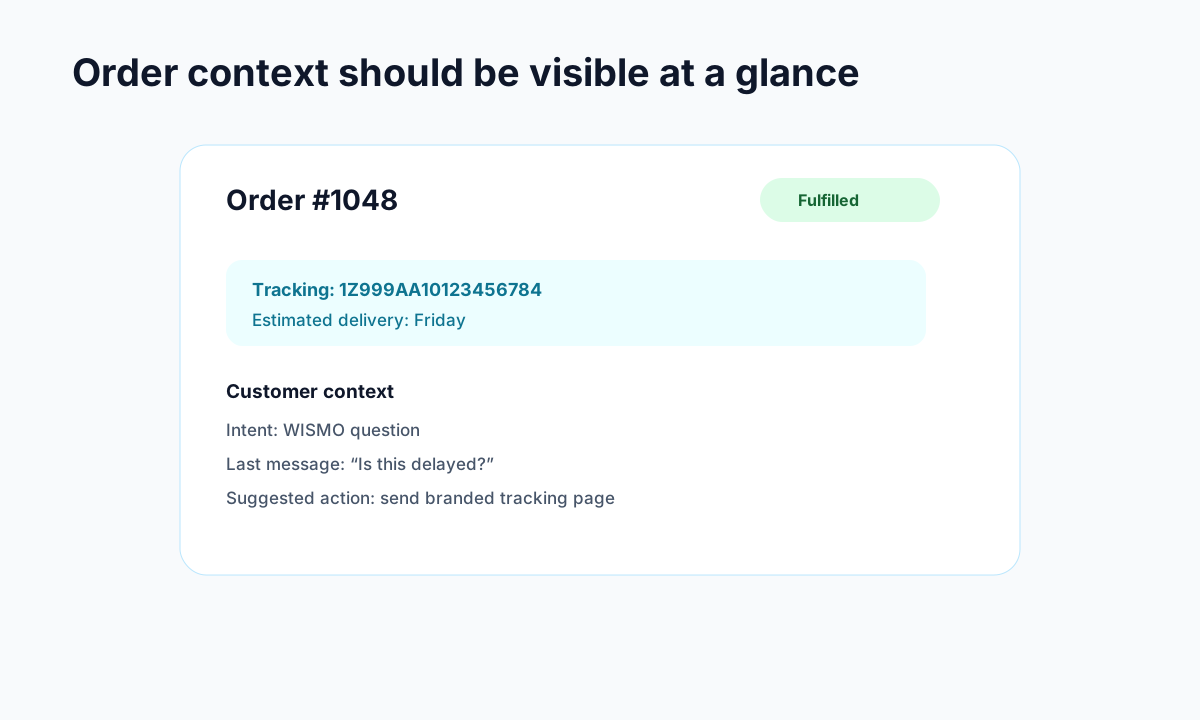
Example: the order context support teams need before replying.
A lot of articles treat tracking as if the job ends once a carrier link exists. It does not.
A useful Shopify order tracking setup should answer four things clearly:
- has the order been confirmed?
- has it shipped?
- where is it now?
- what can the customer do next if something changes?
That last part is where many stores fail. A tracking page that only shows carrier events but does not explain delays, returns, cancellations, or how to get help still creates friction.
That is why a real Shopify order tracking guide needs to cover both status visibility and customer self-serve clarity.
Shopify order tracking vs order status: they are not the same thing
<!-- trexa-section-visual:tracking -->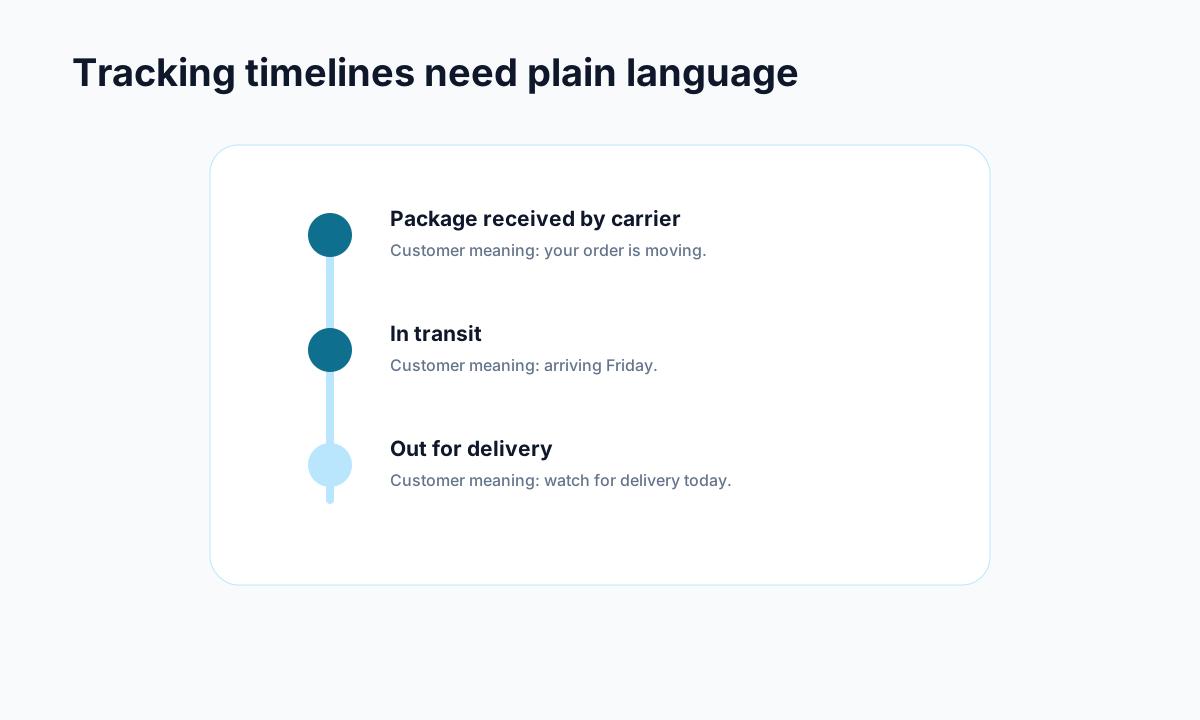
Example: carrier events become useful when they are translated into plain customer language.
One of the more useful distinctions in recent tracking coverage is the difference between order status and order tracking.
Order status is your internal or store-level state. It answers questions like:
- unfulfilled or fulfilled?
- partially fulfilled?
- delivered?
- returned?
Order tracking is the carrier-side journey after the package leaves your operation. It answers questions like:
- label created
- in transit
- out for delivery
- delivered
- exception or delay
Customers do not usually care about this distinction in technical terms. They just want answers. But if your store only handles one side well, the customer experience breaks.
That is why the best post-purchase systems combine both:
- store-side status context
- carrier-side movement updates
- proactive communication
- a branded place to check what is happening
What Shopify gives you natively
Shopify does a decent job with the basics.
Out of the box, you can:
- add tracking numbers to fulfilled orders
- send shipping confirmation emails
- show tracking on the order status page
- let customers use Shopify’s default tracking flow and Shop app experience
For a smaller store with low order volume and one main carrier, this may be enough.
Shopify also emphasizes that tracking should be easy to find, not buried in confusing post-purchase emails. That part is worth taking seriously. Customers should not have to copy and paste long tracking codes into a carrier site just to understand where their order is.
Where Shopify order tracking starts to fall short
Native Shopify tracking is functional. It is not always enough.
The cracks usually show up when you have:
1. Multiple carriers
As soon as your fulfillment setup gets more complex, the experience becomes less consistent.
2. Limited proactive communication
A single shipping confirmation email is better than nothing, but it does not cover delays, delivery exceptions, or helpful post-delivery next steps.
3. Weak branding after checkout
Customers buy from your store, then get sent into a carrier-style experience that often feels generic and disconnected.
4. No clear self-serve next action
Even if a customer can see where the package is, they may still not know:
- when it is expected
- what a delay means
- whether they can cancel
- how to start a return
- where to ask a question without opening a ticket
That is how tracking pages still produce support tickets.
We touched on the broader support cost in What is WISMO and Why It Costs Your Shopify Store Money and the branding side in Branded Order Tracking Pages: Why Your Shopify Store Needs One. Order tracking sits right in the middle of both.
Best practices every Shopify order tracking guide should recommend
<!-- trexa-section-visual:comparison -->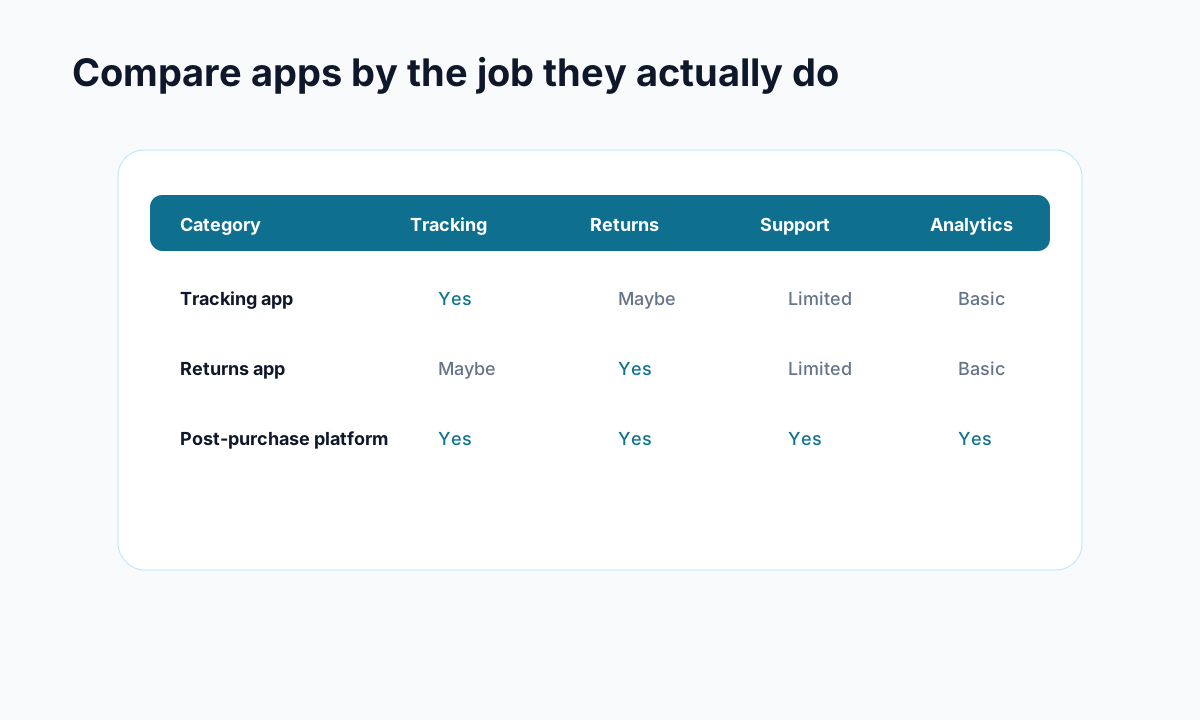
Example: compare apps by the operational jobs they cover, not by feature-page language.
If you want a tracking setup that reduces confusion instead of just displaying shipment events, start here.
Make tracking access obvious
Tracking links should appear in:
- order confirmation emails
- shipping confirmation emails
- account order history
- support help flows
Do not make customers hunt.
Use plain language
Carrier language is often terrible. “Tendered to delivery provider” means something to operations teams, not to worried customers.
Translate statuses into normal language wherever possible.
Add estimated delivery context
A tracking page is much more useful when it includes a visible ETA or realistic delivery window, not just a raw event log.
Communicate exceptions proactively
If a shipment stalls, customers should hear it from you before they feel forced to ask. This is one of the simplest ways to reduce support load.
Keep the experience branded
Loop highlights something a lot of stores overlook: tracking emails and tracking pages are among the most engaged post-purchase touchpoints. If that traffic leaves your brand immediately, you lose both trust and attention.
A branded order tracking page keeps customers in a familiar environment and gives you a better place to answer common questions.
Include help and policy links
Useful tracking pages should link to:
- return policy
- shipping policy
- support contact path
- common delivery questions
The best pages do not just show information. They reduce uncertainty.
Connect tracking with post-purchase actions
Tracking should not be a dead-end page. It should sit inside a broader post-purchase experience.
That can include:
- AI answers for common questions
- self-serve returns
- cancellation handling
- delivery issue guidance
- reorder or cross-sell prompts only when they make sense
That is where tools like Trexa can help. Not because every store needs a giant support suite, but because customers often need more than just a tracking number after they buy.
A practical Shopify order tracking setup for growing stores
If your store is growing and native tracking no longer feels sufficient, a sensible setup usually looks like this:
Stage 1: Shopify native basics
Use Shopify’s built-in tracking, fulfillment updates, and order status page.
Stage 2: Better tracking communications
Improve shipping confirmation and post-purchase email flows so customers know what to expect.
Stage 3: Branded tracking destination
Move customers toward a branded order tracking page instead of dumping them into a generic carrier experience.
Stage 4: Self-serve post-purchase support
Add returns, cancellation flows, delivery issue help, and AI-assisted answers in the same destination.
This progression is usually more effective than trying to “solve WISMO” with a few extra email templates alone.
Why a better Shopify order tracking experience reduces support tickets
<!-- trexa-section-visual:support -->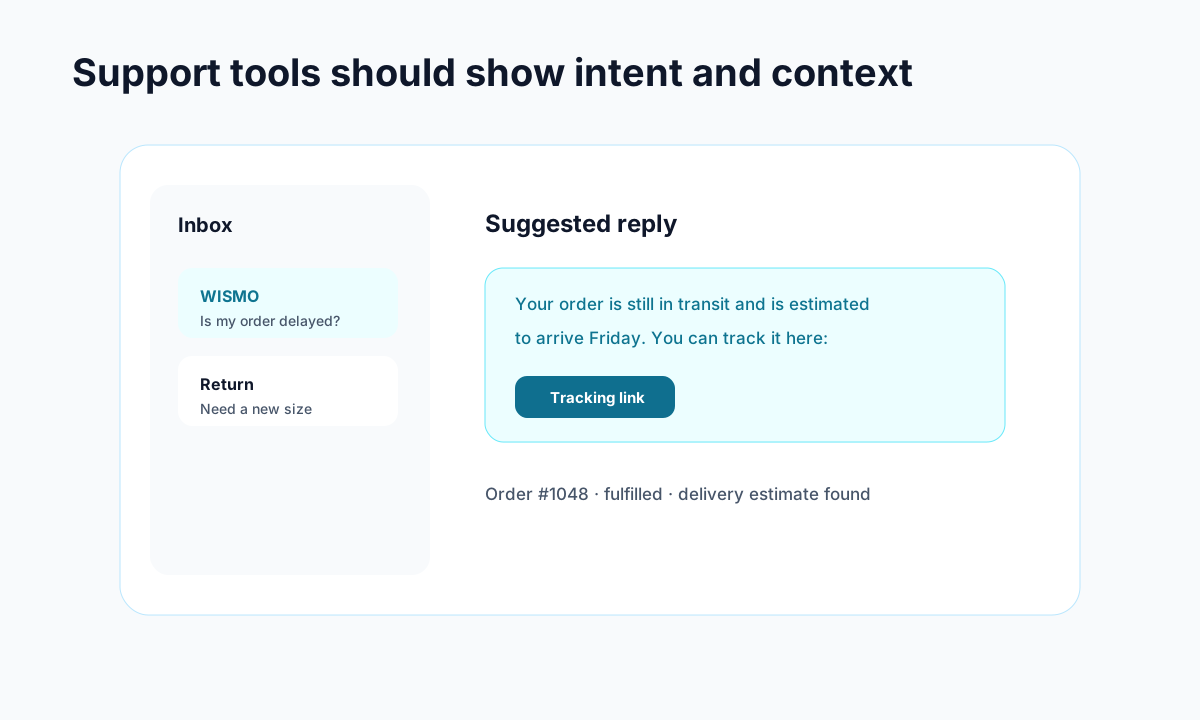
Example: support gets faster when intent, order context, and draft replies live together.
This is the real business case.
When tracking is hard to find, unclear, or disconnected from next-step help, customers email support. When tracking is visible, branded, and paired with clear self-serve options, they usually do not need to.
Shopify’s own guidance stresses easier access to tracking information. Broader ecommerce examples from Loop show why that matters in practice: order tracking pages are high-engagement surfaces, and strong branded experiences can reduce “where is my order” volume while improving retention and cross-sell opportunities.
In other words, tracking is not just logistics. It is customer experience design.
Final take: a Shopify order tracking guide should help customers feel informed, not stranded
If your current setup technically provides tracking but still generates confused emails, it is probably not doing enough.
A good Shopify order tracking experience should:
- show clear progress
- explain what is happening
- keep customers inside your brand
- offer the next best action when something goes wrong
That is the standard worth aiming for in 2026.
If you are already thinking beyond basic carrier links, tools like Trexa can help turn post-purchase tracking into a cleaner self-serve experience instead of another support funnel.
Ready to reduce your support tickets?
Trexa gives your Shopify store AI-powered order tracking, automated support, and self-serve returns. Start free with 10 orders/month.
Start FreeExplore related Trexa pages