Shopify Order Cancellation: Best Practices for 2026
Learn how to handle Shopify order cancellation requests with clear cutoff times, refund rules, and post-purchase fixes that reduce support load.
Shopify Order Cancellation: Best Practices for 2026
Shopify order cancellation is one of those workflows that looks simple until it starts costing you money. A customer changes their mind, enters the wrong address, or spots a discount code too late. Suddenly your team is juggling refunds, restocks, fulfillment holds, and support replies. The goal is not just to cancel orders correctly. It is to build a process that protects margin, keeps customers calm, and stops avoidable tickets from piling up.
In this guide, you'll learn when a Shopify order can be canceled, what to do before you hit cancel, and how to reduce cancellation requests without making the buying experience worse.
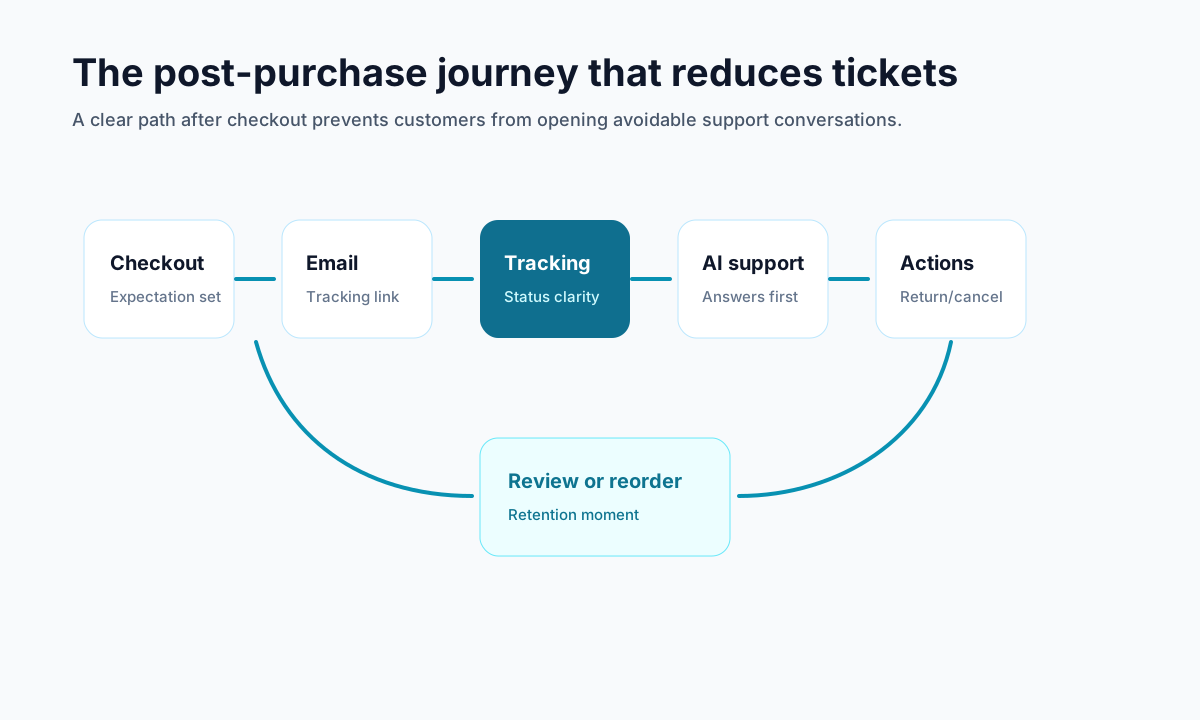
<!-- trexa-visual-elements:start -->Visual guide: cancellation flow
A cancellation flow should be fast when the answer is obvious and assisted when the order can still be saved.
| Cancellation reason | Best response | Metric to watch |
|---|---|---|
| Wrong item or address | Offer edit/help before cancellation. | Saved orders |
| Shipping concern | Show tracking context and delivery expectations. | Avoided WISMO tickets |
| Changed mind | Offer store credit or easy cancellation depending on fulfillment state. | Repurchase rate |
Shopify order cancellation basics every merchant should know
<!-- trexa-section-visual:order -->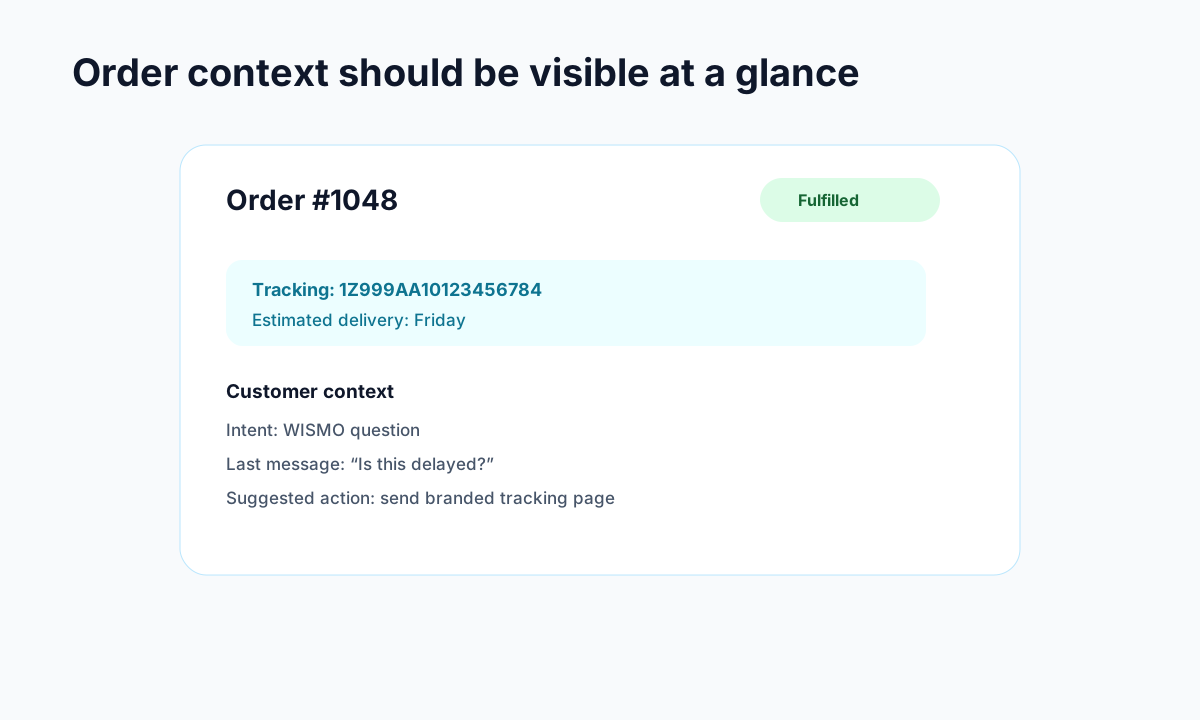
Example: the order context support teams need before replying.
At the admin level, Shopify lets you cancel orders, choose a refund method, restock inventory, and notify the customer. Shopify's developer docs also note a few important limits: cancellations are irreversible, orders with certain payment or fulfillment issues may not be cancelable, and active returns can block the workflow.
Before you process a cancellation, check these three things first:
- Fulfillment status. Unfulfilled orders are the easiest to cancel. Partially fulfilled orders need more care. Fully fulfilled orders often need a return workflow instead.
- Payment status. If a payment was only authorized, canceling may void the charge. If it was already captured, you need to decide how the refund should work.
- Inventory and shipping state. If a label was purchased or a 3PL already started picking, you need to stop that process fast or you will pay for work on an order that no longer exists.
This is where a lot of stores slip. They treat cancellation like a support action when it is really an operations action with support, finance, and logistics attached to it.
For background on adjacent support workflows, see Trexa's guides on reducing Shopify support tickets and what WISMO means for ecommerce teams.
What a good Shopify order cancellation process looks like
<!-- trexa-section-visual:cancellation -->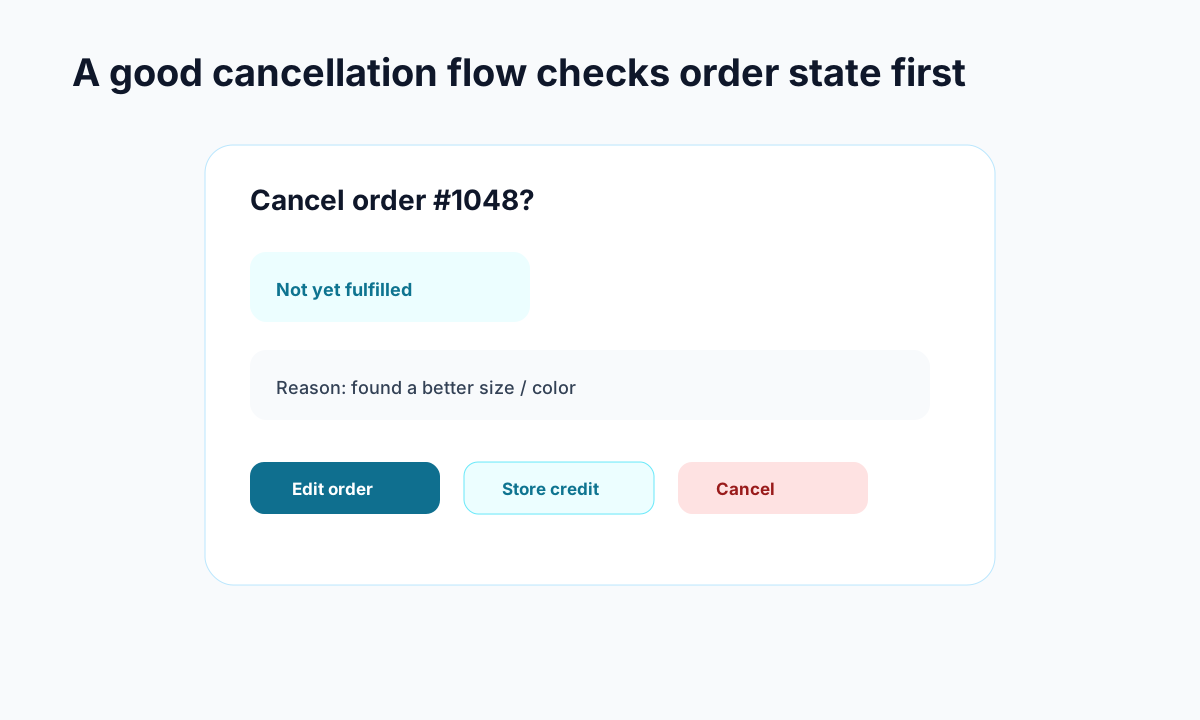
Example: cancellation flows work better when they check fulfillment state before showing options.
A solid Shopify order cancellation process should be fast, consistent, and easy for staff to follow. If every request turns into a one-off judgment call, you will get mistakes, refund delays, and confused customers.
A practical workflow usually looks like this:
1. Set a cancellation window
Give customers a clear cutoff, such as 30 or 60 minutes after purchase, or before the order enters fulfillment. This removes ambiguity and makes it easier for support to enforce the policy.
2. Pause fulfillment briefly
If your volume allows it, create a short buffer before orders are released to the warehouse. Even a 30 minute hold can prevent expensive "we already shipped it" problems.
3. Use clear cancellation reasons
Track whether orders are canceled because of fraud concerns, wrong items, duplicate orders, address mistakes, or buyer's remorse. These reasons are not just admin details. They tell you what is broken upstream.
4. Decide refund rules in advance
Know when you offer original payment refunds, when store credit makes sense, and when partial refunds belong in a different workflow.
5. Notify the customer immediately
A fast confirmation email cuts anxiety and prevents the classic follow-up ticket asking whether the cancellation actually went through.
This matters because many "cancel my order" requests are not true cancellations at all. Competitor content from Cleverific cites internal data suggesting more than 80% of canceled Shopify orders are quickly replaced with a new order, often because the shopper made a fixable mistake. That lines up with what many merchants see in practice: customers are trying to correct the order, not disappear.
How to reduce Shopify order cancellation requests without frustrating customers
The best way to handle Shopify order cancellation is to prevent unnecessary requests in the first place. Most stores do not need a harder policy. They need a better post-purchase experience.
Here are the biggest levers:
Offer self-serve fixes before cancellation
If the real issue is a wrong size, missing apartment number, or forgotten discount code, a cancellation is overkill. Giving customers a way to edit the order during a short window can save the sale and reduce support load.
This is one reason post-purchase tooling matters. A branded order page or account area can do more than show tracking. It can guide customers to the next best action before they email support in a panic. Trexa's post on branded order tracking pages explains why keeping customers in your own experience matters after checkout too.
Tighten your checkout and product detail pages
If you keep seeing the same cancellation reasons, the problem often starts before purchase. Common examples include:
- confusing variant selection
- unclear delivery timelines
- surprise shipping costs
- weak sizing information
- discount rules that are easy to miss
Fixing those issues can lower cancellation volume more effectively than any support script.
Create a separate path for high-risk orders
Fraud and inventory issues should not follow the same playbook as a customer who changed their mind. Build a clear SOP for high-risk orders so staff know when to cancel, when to hold, and when to escalate.
Consider store credit carefully
Some brands offer an incentive to take store credit instead of a cash refund. That can work, but only if it feels fair and immediate. If you use this approach, make it optional and easy to understand.
Shopify order cancellation policy tips that actually help
Your Shopify order cancellation policy should not read like legal armor. It should answer the real questions customers have when they are stressed and trying to fix a mistake.
A useful policy should cover:
- how long customers have to request cancellation
- whether customized or made-to-order items can be canceled
- when orders move into fulfillment and become harder to stop
- how refunds are issued and how long they take
- whether store credit is available
- how customers should contact you if they need help
Keep the language plain. Put the policy where people can actually find it: checkout FAQ, confirmation email, help center, and order status area.
Authoritative Shopify documentation is also worth reviewing when you set your rules, especially around cancellation limits, refund handling, and inventory restocking behavior: Shopify orderCancel mutation docs.
When to use apps or automation for Shopify order cancellation
<!-- trexa-section-visual:comparison -->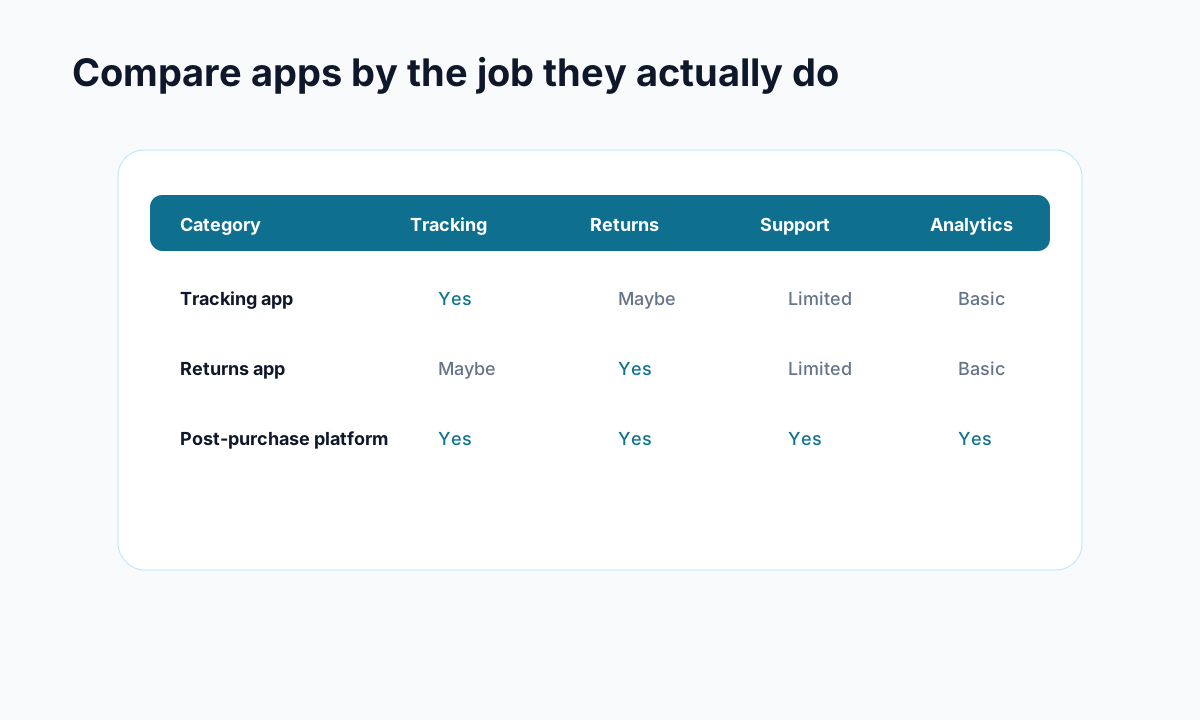
Example: compare apps by the operational jobs they cover, not by feature-page language.
If you're handling more than a handful of cancellations per week, manual processing gets messy fast. That is where automation starts earning its keep.
Look for tools or workflows that help you:
- hold orders for a short edit or cancel window
- let customers update order details without opening a ticket
- trigger clear notification emails
- log cancellation reasons in a structured way
- separate true cancellations from editable mistakes
For many stores, tools like Trexa fit best when the goal is not just to process cancellations, but to reduce the support burden around them. If customers can self-serve tracking, returns, and routine post-purchase questions in one place, your team gets fewer reactive tickets and more time for issues that actually need a human.
Final take on Shopify order cancellation
A clean Shopify order cancellation process protects more than customer experience. It protects margin, team time, and operational sanity. If your store treats every cancellation as an isolated support task, you will keep paying for the same avoidable mistakes.
Start with the basics: clear cutoff times, fast internal handling, reliable customer notifications, and better tracking of cancellation reasons. Then move upstream by fixing the checkout problems and post-purchase gaps that create those requests in the first place.
Do that well, and cancellations stop being chaos. They become just another controlled part of running a healthy Shopify store.
Ready to reduce your support tickets?
Trexa gives your Shopify store AI-powered order tracking, automated support, and self-serve returns. Start free with 10 orders/month.
Start FreeExplore related Trexa pages